



































Pragmata’s Diana, Hair Technology, and the Bigger Question for Buyers: What Kind of Gaming PC in Canada Do You Actually Need?
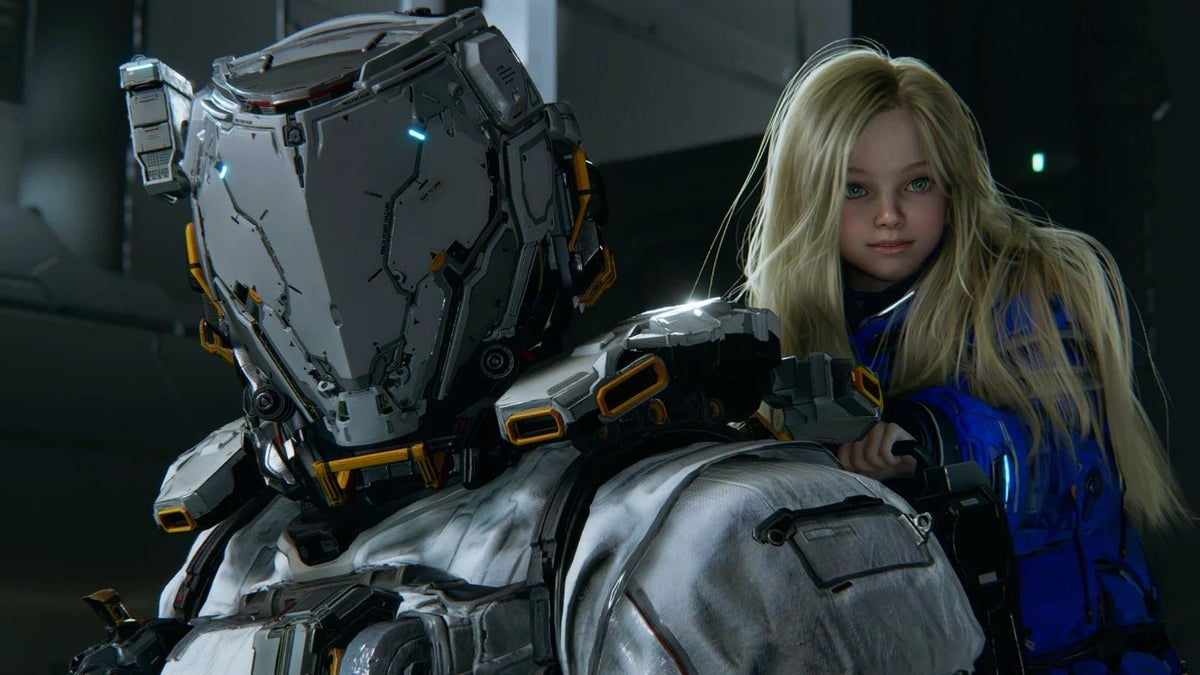
The latest gaming PC Canada conversation is not just about frame rates, ray tracing, or resolution. It is also about how modern games are being built. In fresh coverage surrounding Pragmata, Capcom developers reportedly explained how Diana’s long hair demanded an unusually complex animation approach, with hundreds of thousands of animation points used to preserve the character’s intended look. That detail matters because it highlights a bigger truth for PC buyers in Canada: modern games are becoming more technically ambitious in ways that are not always obvious from a trailer alone.
When a studio chooses visual fidelity over easier shortcuts, it usually means more work during development, more advanced rendering expectations, and a stronger chance that players will want more GPU power, more CPU headroom, faster storage, and better long-term system balance. So if you are reading gaming news like this and wondering, what gaming PC do I need for the next wave of visually demanding releases, you are asking exactly the right question.
For shoppers looking at new AAA games, creator workflows, streaming plans, or a system that will not feel outdated too soon, this is where a custom PC becomes far more important than a generic spec sheet. At Groovy Computers, the goal is not just to sell a box with parts in it. The goal is to help Canadian buyers choose a system that fits what they actually want to do next.
What did the Pragmata update reveal, and why should PC buyers care?
According to the source material, Capcom discussed how Diana’s hairstyle was almost simplified because animating long hair at that quality level required major production effort. The team reportedly tested a short-haired version before deciding that long hair better matched the character and story. On the surface, that sounds like a pure art-direction story. Underneath, it is a useful reminder that visual detail in modern games is not free.
Hair simulation, facial animation, cloth movement, lighting, dense geometry, and cinematic effects all add up. Even when a particular effect is not the sole reason a game runs heavily, it reflects the kind of development priorities that push hardware harder across the board. If you are planning for upcoming games, are you only thinking about minimum requirements, or are you thinking about how you want games to actually feel on your screen six months or a year from now?
That is the difference between buying a PC that merely launches a game and buying a PC that gives you the experience you were hoping for.
Why this matters more in Canada when choosing a gaming PC
Canadian buyers often face a different decision than shoppers casually browsing mass-market systems. Pricing pressure, supply shifts, GPU demand spikes, and replacement cost increases can hit harder when you are trying to buy a quality system without wasting money on the wrong tier. A weak purchase made today can become a more expensive correction tomorrow.
That is why timing matters. Are you buying before a major game release? Before your current PC starts stuttering in new titles? Before another jump in demand for graphics cards, memory, or high-capacity SSDs? Or are you waiting until you are forced to replace your system under pressure?
A well-planned custom gaming PC Canada purchase can be the smarter move, especially when the goal is to avoid upgrading too soon. Instead of chasing bargain-bin specs that age fast, many buyers are better served by choosing a balanced custom build with proper cooling, tested part compatibility, and enough headroom for the next few years of game and software demands.
What do you want your next PC to do for you?
Before comparing parts, it helps to ask the most important buying question first: what do you want your next PC to do for you?
Do you want a system mainly for AAA gaming? Competitive esports? 1440p high refresh gameplay? 4K visuals with ray tracing? Or do you also want to stream, edit videos, make thumbnails, run Adobe apps, or create 3D assets?
Maybe you are not just a player. Maybe you are a content creator, a part-time editor, a student designer, or someone who wants one machine that can game at night and work hard during the day. If that sounds like you, then the right answer may not be a simple budget gaming tower. It may be a creator PC Canada build or a hybrid gaming-and-creation system with stronger multitasking capability.
Ask yourself:
- What games do I actually play or plan to play next?
- Do I care more about 1080p value, 1440p smoothness, or 4K visual quality?
- Do I want ray tracing, high settings, and strong minimum frame rates?
- Will I stream on OBS, record gameplay, or upload to YouTube?
- Will I use Photoshop, Premiere Pro, DaVinci Resolve, Illustrator, Blender, or Unreal Engine?
- Am I buying for now only, or do I want to avoid replacing this PC too soon?
The clearer your answer, the easier it is to choose the right system category.
If games are becoming more complex, what performance tier fits you?
Not everyone needs the same machine. The right performance tier depends on how demanding your games and software really are, and how much longevity you expect from the purchase.
Entry-level and budget-focused buyers
If your goal is straightforward 1080p gaming, lighter esports titles, indie releases, and strong everyday use, a budget gaming PC Canada build can still make sense. This tier is often ideal for first-time buyers, students, and players who want good value without chasing every graphical feature.
But ask yourself an honest question: will you be happy with a lower tier if the games on your wishlist become much more demanding? If your dream is to jump into visually advanced new releases with high settings, buying too low can mean upgrading sooner than expected.
Mid-range buyers who want the sweet spot
For many Canadian players, 1440p is the real value zone. A 1440p gaming PC Canada build often delivers the best mix of sharp visuals, strong frame rates, and longer relevance in modern games. If you want a machine that can handle cinematic single-player titles, online shooters, and some streaming or editing on the side, this is often the most balanced range.
Are you the kind of buyer who wants strong performance now without jumping straight to an ultra-premium budget? Then this tier is often the one to look at first.
High-end and premium buyers
If your target is 4K gaming, aggressive ray tracing, ultra settings, high-refresh premium displays, or a longer runway before your next upgrade, then a high end gaming PC Canada build is worth serious attention. This is the tier for enthusiasts who want fewer compromises and more confidence as games keep evolving.
If the news around games like Pragmata makes you think about rising technical ambition, then a premium build becomes less of a luxury and more of a strategic purchase. How long do you want your next PC to last? And how much would it cost you to buy too little now, then replace major components earlier than planned?
Are you only gaming, or do you also need streaming and creator performance?
One of the biggest mistakes buyers make is choosing a gaming system as if gaming is the only workload that matters. That may be fine if it truly is. But many customers need more than that.
Do you want to stream on Twitch or YouTube? Record gameplay while keeping gameplay smooth? Cut clips for TikTok, Shorts, or Reels? Edit 4K footage? Design channel graphics? Work in Photoshop and Illustrator? Render 3D scenes in Blender?
If yes, then you may need a streaming PC Canada or a content creation PC Canada instead of a gaming-only configuration. The right system for mixed workloads often benefits from more RAM, stronger CPU multitasking, better thermal planning, faster scratch storage, and the right GPU for both gaming and creator acceleration.
Gaming and streaming on one machine
If you want one PC for gameplay and livestreaming, you should think beyond average FPS. A proper gaming and streaming PC Canada build should handle your game, OBS, browser tabs, chat tools, voice software, plugins, and background tasks without turning your stream into a stutter-fest.
So ask yourself: do you want to stream casually at 1080p, or do you want cleaner quality, higher consistency, and room for editing recorded footage after? If the answer is yes, a better-tier CPU and GPU pairing may be the smarter buy.
Editing and creator workloads
If you create content after gaming, then your PC needs to save you time as well as entertain you. A true video editing PC Canada or custom creator PC Canada build can improve timeline smoothness, export speed, background cache performance, and multitasking reliability.
Are you editing in Adobe Premiere Pro? Working in DaVinci Resolve? Building layered compositions in After Effects? The right creator PC can make those tasks far less frustrating. And if you handle photo work too, a strong photo editing PC Canada setup with fast SSDs and plenty of RAM can transform your workflow.
Design and image-heavy work
For designers, social media managers, brand builders, and photographers, responsive workflow matters. A quality graphic design PC Canada build can help with large canvases, batch exports, AI tools, multiple displays, and Adobe Creative Cloud performance. If your PC drags every time you move between Photoshop, Illustrator, Lightroom, and a web browser full of assets, that is not just annoying. It costs time every day.
What if your work includes 3D modeling, rendering, or technical software?
The source story about Diana’s hair naturally points to a more advanced question: what if you are interested not only in playing visually ambitious games, but also in creating them, studying asset pipelines, or working in 3D software yourself?
If that sounds like you, then a gaming-first build may not be enough. A 3D modeling PC Canada or workstation PC Canada system is often the right answer for Blender, Unreal Engine, CAD, rendering, simulation, and heavier scene work.
Do you need viewport responsiveness, render acceleration, larger memory capacity, and CPU horsepower for complex projects? Are you learning game development or producing digital art? Then your ideal PC may look very different from a standard entry-level gaming desktop.
Many buyers ask, is a gaming PC good for Blender or workstation PC vs gaming PC. The answer is: sometimes, but only if the build is chosen properly. A custom system lets you prioritize the actual workload instead of settling for generic compromises.
Why custom PC building matters more as game visuals get heavier
As games become more detailed, system balance becomes more important. It is not enough to chase a single flashy component while neglecting cooling, storage speed, power supply quality, airflow, or upgrade path.
This is where a custom PC builder Canada approach stands out. A well-built custom system is selected as a complete platform, not as a random pile of parts. GPU and CPU pairing matters. Case airflow matters. Memory capacity and speed matter. SSD performance matters. Noise and thermals matter. Reliability matters.
Have you ever seen a spec sheet that looks decent, but hides weak cooling, poor power delivery, limited expandability, or awkward component mismatches? That is exactly the kind of problem many buyers want to avoid.
At Groovy Computers, custom builds are designed around what the customer actually needs, then rigorously tested before they go out. That matters whether you are buying a gaming system, a creator PC, or a workstation. A machine that has been stress tested and configured properly inspires far more confidence than one chosen purely by headline specs.
Should you buy now or wait if new games keep raising the bar?
This is one of the most common buyer questions: is it better to buy a gaming PC now or wait?
The answer depends on your timeline, your current hardware, and what you want your next system to handle. But there are practical reasons many buyers choose to move sooner rather than later.
- Upcoming games often increase demand for stronger GPUs and CPUs.
- Price pressure can affect graphics cards, memory, and storage with little warning.
- Buying too late can force a rushed decision when your current PC is already struggling.
- Waiting does not guarantee better value if replacement costs climb in the meantime.
If your current system is already borderline for the kinds of games or workloads you care about, waiting can be more expensive than it looks. Are you trying to hold out for one more launch cycle, even though you already know your PC is underpowered? Or would it be smarter to lock in a better build now and enjoy it immediately?
Could financing help you secure a stronger system before prices rise?
For many shoppers, the real choice is not between buying and not buying. It is between buying too little now or getting the system they actually need through a manageable payment plan. That is why financing matters.
If stepping up one performance tier helps you avoid replacing your PC too soon, is that a smarter long-term decision? If a stronger GPU, more RAM, or better processor would meaningfully improve your gaming and work experience, should you settle for less just to lower the upfront total?
Groovy Computers helps customers explore options that can make a stronger purchase more achievable, including financing up to 4 years. For some buyers, that means securing the right gaming or creator system now instead of revisiting the same problem in a few months.
This is especially relevant if you are comparing an entry-level machine against a better-balanced custom build. A payment plan can make the stronger option feel realistic without forcing you into a weak short-term compromise. If you are asking, should I finance a better PC instead of buying a cheaper one, the answer often comes down to how soon you would outgrow the cheaper system.
Which type of buyer should choose which system category?
Here is a practical buying guide based on common customer profiles.
Choose a budget-oriented gaming system if:
- You mainly play esports, lighter games, or older AAA titles.
- You are targeting 1080p and want the best possible value.
- You are a first-time buyer and want a solid foundation.
- You understand you may need an upgrade sooner if new games become much heavier.
Choose a balanced mid-range gaming system if:
- You want 1440p gaming with strong settings and smoother longevity.
- You play a mix of competitive and cinematic games.
- You want some headroom for streaming, recording, or creative work.
- You want to avoid feeling underpowered too quickly.
Choose a premium RTX gaming PC if:
- You want high-refresh 1440p or 4K gaming.
- You care about ray tracing, visual quality, and future readiness.
- You want your PC to stay relevant longer in demanding titles.
- You would rather buy once properly than upgrade in stages.
Choose a creator or editing PC if:
- You edit video regularly.
- You use Adobe Creative Cloud, DaVinci Resolve, or similar software.
- You need faster exports, smoother timelines, and better multitasking.
- You game too, but productivity matters just as much.
Choose a 3D modeling or workstation system if:
- You use Blender, Unreal Engine, CAD, rendering, or technical software.
- You need reliability under heavier sustained workloads.
- You benefit from higher RAM capacity, stronger compute performance, and workstation-style planning.
- You want a machine built for output, not just entertainment.
What questions should you ask before buying your next PC?
Before you make a decision, ask yourself the questions that actually affect long-term satisfaction.
- What am I really using this PC for over the next 2 to 4 years?
- Do I want 1080p, 1440p, or 4K performance?
- Do I care about ray tracing or ultra settings?
- Will I stream, record, edit, design, or model on the same system?
- How much RAM and storage will I realistically need?
- Do I want a basic stopgap, or a more future-ready machine?
- Would financing help me avoid buying underpowered hardware?
- Do I want a tested, warrantied custom build from a Canadian company?
These are the questions that lead to a better outcome than simply sorting systems by lowest price.
Why Groovy Computers makes sense for Canadian buyers
Groovy Computers is built around a simple idea: help customers get the right PC for what they actually need. That means gaming systems, creator PCs, and workstation builds that are selected with purpose, assembled carefully, and tested before shipping.
For buyers in Nova Scotia, Atlantic Canada, and across the country, that kind of trust matters. You want a Canadian custom PC builder that understands real-world use cases, offers support, and stands behind the build. That is especially important when you are spending on a system that needs to stay reliable through gaming sessions, editing projects, streaming nights, and demanding productivity work.
Groovy Computers also offers a 1-year warranty, which adds peace of mind when choosing a custom system. If you are spending on a stronger build to avoid headaches later, support matters just as much as raw specs.
Need help choosing the right performance tier for new games and creative work?
If the story about Diana’s animation detail made you realize that modern games are only getting more ambitious, then this is the right time to assess your hardware plans. Are you shopping for a budget-friendly first gaming setup, a balanced 1440p machine, a premium RTX system, a streaming-ready build, or a creator workstation that can handle both play and production?
If you are not sure which route makes the most sense, Groovy Computers can help you narrow it down based on your games, your software, your monitor resolution, your performance goals, and your budget. Instead of guessing, you can shop with a clearer strategy and a better chance of getting a PC that still feels right long after the initial excitement wears off.
Want help choosing a gaming PC Canada build that matches the way you actually play, create, and work? Visit GroovyComputers.ca to explore custom builds, discuss options, and see whether a stronger system or a financing plan makes more sense for your situation.
Final thoughts: game technology changes fast, so buy with a plan
Capcom’s comments about Diana’s hair in Pragmata may sound like a small production anecdote, but it reflects a major trend. Game technology keeps moving forward. Visual detail, animation complexity, and cinematic presentation are raising the standard. For players and creators alike, that means buying a PC should be less about chasing the cheapest entry point and more about choosing the right platform for what comes next.
The best gaming PC Canada decision is the one that fits your actual goals: your games, your display, your software, your workflow, and your timeline. If you want a PC that can handle modern gaming while leaving room for streaming, editing, design, or 3D work, a tested custom build from Groovy Computers is the smarter path.
#GamingPCCanada #CustomGamingPCCanada #GamingPCBuilderCanada #CanadianCustomPCBuilders #CreatorPCCanada #VideoEditingPCCanada #StreamingPCCanada #3DModelingPCCanada #WorkstationPCCanada #NovaScotiaComputers
Groovy Computers | All Rights Reserved


Leave a comment
This site is protected by hCaptcha and the hCaptcha Privacy Policy and Terms of Service apply.