



































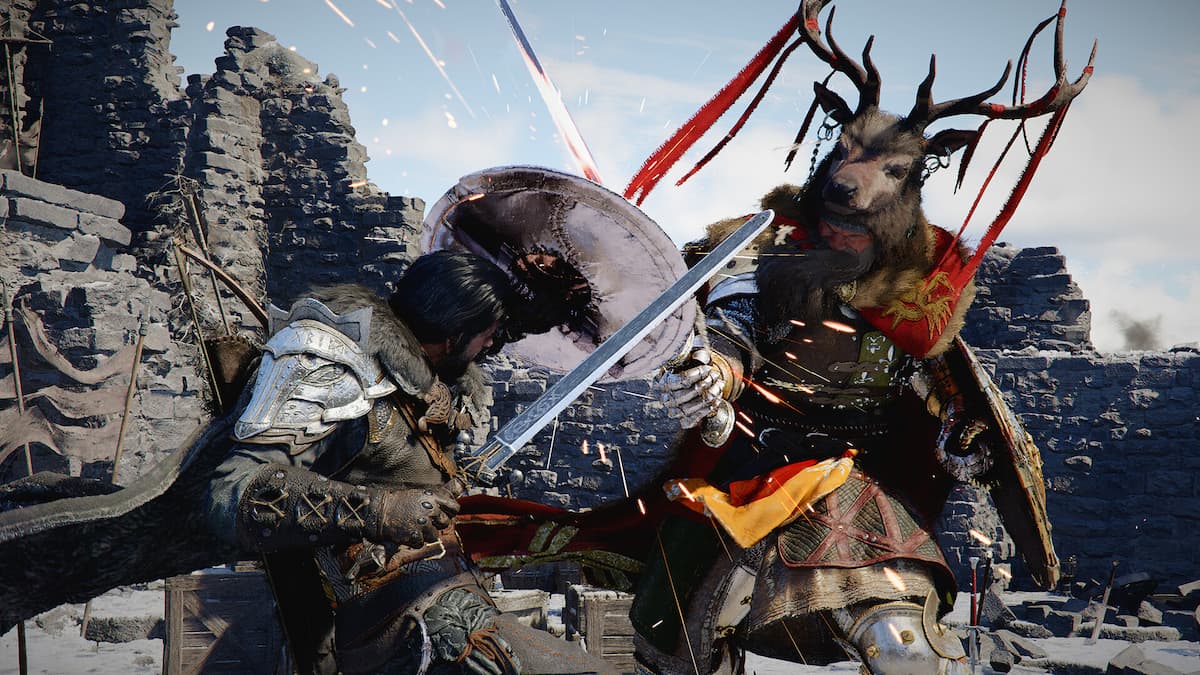
Crimson Desert’s Massive Trading Update Is a Reminder: A Gaming PC for New Games Needs More Than Just Raw Power
Crimson Desert’s latest trading-focused update is exactly the kind of open-world news that gets PC gamers thinking beyond simple “Can my computer run it?” questions. When a huge action RPG expands its economy systems, adds new trade goods, improves profitability, rewards long-distance routes, introduces a trade map tab, and continues polishing stability through bug fixes, it does more than give players a new way to earn in-game currency. It reminds Canadian gamers that a modern Gaming PC for New Games needs to handle sprawling worlds, dense systems, long sessions, streaming, multitasking, updates, mods, creator workflows, and future releases without feeling outdated six months later.
For Groovy Computers customers, the bigger takeaway is simple: if you are excited by open-world RPGs like Crimson Desert, fantasy adventures, ray-traced AAA games, creator-friendly gaming setups, or high-performance streaming builds, your next PC should be chosen around what you actually want to do. Are you planning to play at 1080p with smooth frame rates? Do you want 1440p ultra settings? Are you aiming for 4K, ray tracing, and high-end visuals? Will you stream your trading routes, edit gameplay clips, record YouTube content, or run creative software on the same system?
This is where a custom-built desktop becomes more than a purchase. It becomes a performance plan. At Groovy Computers, we build gaming PCs, creator PCs, and workstation PCs for Canadian buyers who want systems matched to real workloads, real games, and real upgrade goals. Whether you are shopping for a budget gaming computer, a premium RTX gaming PC, a custom creator PC, a video editing workstation, or a 3D rendering system, the best build is the one designed around your next few years of use—not just one launch-week requirement.
What Changed in Crimson Desert, and Why Should PC Buyers Care?
The latest Crimson Desert update puts a much bigger spotlight on trading. The update increases profit potential from trading, adds more reasons to transport goods to harder-to-reach places, improves rewards from royal trading posts, adds new trade goods, and introduces a trade map tab to help players engage more deeply with the system. In short, it gives players more reason to roam, plan routes, manage risk, and spend longer periods inside the world rather than simply following the main path.
That matters because open-world games are not static benchmark scenes. They are living systems. One moment you might be exploring a quiet road, and the next you might be moving through a busy settlement, fighting enemies, managing inventory, navigating terrain, and watching dynamic lighting, weather, physics, and NPC systems all interact. If you are playing on PC, those moments are where build quality, CPU strength, GPU performance, memory capacity, storage speed, cooling, and system stability become very noticeable.
Have you ever played a game that ran well in the opening area but struggled later when the map got busier? Have you ever installed a major update and suddenly noticed more stutter, longer loading times, or higher memory usage? That is exactly why buying a gaming PC should not be based only on the lowest acceptable settings. A smart build gives you room for patches, expansions, high-resolution textures, background apps, capture software, and future games.
Crimson Desert’s trading update is a great example of a modern game becoming richer over time. If you are buying a Gaming PC for New Games, you are not just buying for the version of a game that exists today. You are buying for updates, expansions, new content systems, better visuals, and the way your gaming habits will evolve.
Why a Gaming PC for New Games Should Be Built Around Your Real Play Style
Not every player needs the same kind of system. Some gamers want affordable 1080p performance. Some want high-FPS esports responsiveness. Some want cinematic 1440p open-world immersion. Some want 4K gaming with ray tracing. Others want to game, stream, record, edit, and create on one machine. Before you buy, the most important question is not “What is the best PC?” It is: best for what?
What games do you actually play now, and what games are you planning to play next? Are you focused on open-world RPGs, competitive shooters, survival games, racing sims, MMOs, strategy titles, or creative sandbox games? Do you want to play Crimson Desert and other large AAA games at high settings, or are you more concerned with smooth performance in Fortnite, Call of Duty, Valorant, Counter-Strike 2, Minecraft, Roblox, GTA-style open worlds, or future blockbuster releases?
If you are asking “What gaming PC do I need?” the answer depends on your resolution, refresh rate, visual expectations, and multitasking habits. A player using a 1080p 75Hz monitor has very different needs than someone using a 1440p 165Hz display or a 4K OLED screen. A gamer who plays casually after work has different requirements than a streamer who runs OBS, Discord, browser tabs, alerts, overlays, and a capture workflow at the same time.
That is why Groovy Computers approaches custom builds as full-system recommendations. A great gaming desktop is not just a powerful graphics card in a random case. It is a balanced combination of CPU, GPU, RAM, SSD storage, motherboard, power supply, airflow, cooling, and testing. The better the balance, the smoother your experience tends to be over time.
What Do You Want Your Next PC to Do for You?
Before choosing a custom gaming PC, pause and ask yourself a practical question: what do you want your next PC to do for you over the next three to five years?
Do you want a reliable gaming desktop that plays new releases smoothly at 1080p? Do you want a 1440p Gaming PC Canada buyers can rely on for open-world RPGs, shooters, and high-refresh monitors? Do you want a 4K Gaming PC Canada setup built for premium visuals, ultra settings, and ray tracing? Do you want a machine that can double as a Streaming PC Canada setup for Twitch, YouTube Live, or TikTok Live? Do you want to create YouTube videos, edit gameplay clips, design thumbnails, process RAW photos, or work in Blender?
Your answer changes the entire build. A pure gaming system may prioritize GPU performance and strong single-core CPU speed. A gaming and streaming PC may benefit from an RTX GPU with strong encoding support, more RAM, and extra storage. A video editing PC may need a stronger CPU, more memory, fast SSDs, and a GPU that accelerates effects and exports. A 3D modeling workstation may need serious VRAM, high RAM capacity, and a platform designed for sustained workloads.
If you are not sure where you fit, that is normal. Many customers start with one goal and realize they need more flexibility. Maybe you want a gaming PC now, but you are also planning to start streaming. Maybe you are buying for a student who games, edits videos, and uses creative software. Maybe you are a photographer who wants a system that can also run modern games. The best custom PC is built around the full picture.
Which Performance Tier Fits You: Budget, Balanced, Premium, or Workstation?
One of the easiest ways to choose a PC is to think in performance tiers. You do not need to memorize every part number to make a smart decision. You just need to understand what each tier is designed to accomplish.
Budget Gaming PC Canada: Is a Value Build Enough for Your Games?
A budget gaming PC is ideal for players who want strong everyday performance without overspending. This tier is typically aimed at 1080p gaming, popular esports titles, lighter creative work, school use, and general multitasking. If your main question is “How much should I spend on a gaming PC?” a budget-focused build can be a smart entry point if your expectations are realistic.
Can a budget gaming PC play new games? Yes, when it is properly configured, but settings matter. You may need to choose medium to high settings instead of ultra, and you may be targeting 1080p rather than 1440p or 4K. For a player who wants to enjoy open-world games without demanding maximum ray tracing or ultra textures, a value-focused Groovy build can make a lot of sense.
The mistake many buyers make is choosing the cheapest possible system instead of the best-value system. A weak power supply, limited storage, poor airflow, too little RAM, or an underpowered graphics card can turn a “deal” into an upgrade problem. If you want to avoid upgrading too soon, it is worth choosing a build with a sensible upgrade path.
Balanced 1440p Gaming PC Canada: Do You Want the Sweet Spot?
For many Canadian gamers, 1440p is the sweet spot. It looks sharper than 1080p, feels more premium on modern monitors, and does not demand quite as much GPU power as 4K. If you are asking “What PC do I need for 1440p gaming?” the answer usually involves a stronger graphics card, a capable modern CPU, 32GB of RAM for long-term comfort, fast NVMe storage, and solid cooling.
A balanced 1440p gaming PC is a great fit for open-world RPGs, AAA action games, survival titles, racing games, and content creators who want to game and edit on the same machine. It is also a smart tier for players who do not want to chase the most expensive hardware but still want their system to feel fast and modern.
If Crimson Desert’s larger systems and trading routes have you thinking about long play sessions, big maps, and immersive visuals, a 1440p-focused custom gaming PC may be the best balance of cost, performance, and longevity.
Premium Gaming PC Canada: Are You Chasing 4K, Ray Tracing, and Ultra Settings?
A premium gaming PC is built for players who want a high-end experience. This is the category for 4K gaming, ultra settings, ray tracing, high-refresh 1440p, demanding AAA releases, heavy multitasking, streaming, and future-proofing. If you are asking “What PC do I need for 4K gaming?” or “What PC do I need for ultra settings?” you are likely in premium territory.
High-end builds are not only about maximum frame rates. They are also about consistency. A strong premium system can reduce performance compromises, improve 1% lows, support better textures, handle background apps more gracefully, and provide more room for future games. If you are investing in a premium monitor, quality audio, racing wheel, flight setup, capture hardware, or streaming gear, your PC should match the rest of your setup.
Should you finance a high-end gaming PC instead of settling for a cheaper system that may need upgrades sooner? For some buyers, the answer is yes. Financing can help you secure the right performance tier now instead of buying below your needs and paying again later.
Creator and Workstation PC Canada: Are You Gaming, Editing, Rendering, or Designing?
Many modern PC buyers are not just gamers. They are creators, freelancers, students, business owners, designers, editors, streamers, and 3D artists. If you want one machine that can play new games and handle creative work, you may need a Content Creation PC Canada or Custom Workstation PC Canada configuration rather than a basic gaming desktop.
Are you editing in Adobe Premiere Pro, DaVinci Resolve, CapCut, or After Effects? Are you designing in Photoshop, Illustrator, Canva, InDesign, or Affinity software? Are you working with Lightroom, Capture One, or high-resolution RAW photo batches? Are you creating in Blender, Unreal Engine, Unity, AutoCAD, Revit, SolidWorks, Maya, 3ds Max, Cinema 4D, SketchUp, or ZBrush?
If the answer is yes, your PC needs to be designed for more than frame rates. You may need more RAM, faster storage, a stronger CPU, more VRAM, GPU acceleration, multi-monitor support, and better sustained cooling. A gaming PC can be good for content creation, but only if it is configured properly for the software you use.
Why Open-World RPGs Like Crimson Desert Push More Than the GPU
When people shop for a gaming computer, they often focus almost entirely on the graphics card. The GPU is extremely important, especially for 1440p, 4K, ray tracing, and high settings, but open-world games also rely heavily on CPU performance, memory, storage, and system stability.
Large worlds can stress a PC in several ways. The CPU may be handling AI, physics, NPC routines, world streaming, combat calculations, and background systems. The GPU is rendering environments, effects, textures, shadows, lighting, and post-processing. RAM holds active data, while the SSD helps stream assets quickly as you move through the map. If any part of the system is too weak, the experience can suffer.
Have you ever noticed hitching when entering a new area? That can be storage, memory, CPU, engine behaviour, or a mix of all of them. Have you seen frame dips in towns but not in the wilderness? That may point to CPU and asset streaming pressure. Have you turned up textures and suddenly run into stutter? VRAM and memory configuration may be part of the issue.
This is why Groovy Computers focuses on balanced custom builds. A strong GPU paired with too little RAM, a slow SSD, a cramped case, or poor cooling is not ideal. A well-built system is about the complete platform.
Streaming Crimson Desert or Other New Games? Ask These Questions First
Streaming changes the buying decision. A game might run well when played alone, but once you add OBS Studio, browser sources, overlays, chat, alerts, Discord, music, recording, and a second monitor, the workload becomes heavier. If you want a gaming and streaming PC, you should plan for that from the start.
What PC do you need for streaming? Start with your target resolution and frame rate. Are you streaming at 1080p? Are you gaming at 1440p while broadcasting at 1080p? Are you recording high-bitrate footage for later editing? Are you using NVENC-style GPU encoding, CPU encoding, or a mix depending on your software?
A good streaming build should include a strong modern GPU, a capable CPU, enough RAM for multitasking, fast storage for game installs and recorded footage, and stable cooling for long sessions. If you are building a channel around new games, open-world RPGs, guides, trading routes, boss fights, walkthroughs, or livestreamed exploration, a Gaming and Streaming PC Canada setup can be a better long-term investment than a basic gaming-only machine.
Do you need a separate streaming PC? Most customers do not need a dual-PC setup right away. A well-configured custom gaming PC can often handle gaming, streaming, and recording together. But if you are producing at a professional level or running complex live productions, Groovy Computers can help you decide whether one powerful system or a dedicated streaming workflow makes more sense.
Planning to Edit Gameplay, Tutorials, or Social Clips?
Crimson Desert’s trading update may encourage more guide videos, route breakdowns, economy tips, and highlight reels. That matters because editing content is a different workload than gaming. If you want to record your gameplay, edit it, add voiceover, create thumbnails, and publish to YouTube, TikTok, Instagram, or other platforms, your PC should be ready for that workflow.
What PC do you need for video editing? For 1080p editing, a balanced gaming PC can often do well. For 4K editing, heavier codecs, multi-layer timelines, colour grading, and effects, you should consider a stronger CPU, more RAM, an RTX-class GPU, and fast SSD storage. If you use Adobe Premiere Pro, DaVinci Resolve, After Effects, or CapCut, the right hardware can reduce lag, improve timeline responsiveness, and shorten export times.
How much RAM do you need for video editing? Many casual editors can work with 32GB, while heavier 4K, 6K, motion graphics, and multi-app workflows may benefit from 64GB or more. If you also keep a game, browser, Discord, capture software, and editing program open, extra memory becomes even more valuable.
If you are a creator, the question is not just “Can this PC play the game?” It is “Can this PC help me create faster, publish more consistently, and avoid wasting time waiting on exports?” A Custom Creator PC Canada build from Groovy Computers can be designed for exactly that.
Photo Editing, Graphic Design, and Creative Work: Is Your Gaming PC Also Your Business PC?
Many Canadian buyers use one desktop for everything: gaming at night, client work during the day, school assignments, content creation, photo editing, graphic design, and business productivity. If that sounds like you, do not choose a PC based only on game performance.
Do you edit RAW photos in Lightroom or Capture One? Do you work in Photoshop with large layered files? Do you design graphics in Illustrator, Canva, InDesign, CorelDRAW, or Affinity Designer? Do you use AI-assisted creative tools that benefit from a stronger GPU and more memory?
A good photo editing PC benefits from a strong CPU, plenty of RAM, fast SSD storage, and a responsive overall platform. A graphic design PC should feel smooth with large files, multiple apps, and multi-monitor workflows. A gaming PC can be good for Photoshop and graphic design, but it should be configured with creative workloads in mind.
If your computer earns you money, saves you time, or supports your education, the cheapest system may not be the best value. A reliable custom desktop with proper testing, quality components, and warranty support can be a smarter business decision than a random off-the-shelf machine that was never matched to your actual software.
3D Modeling, Rendering, and Game Development: When a Gaming PC Becomes a Workstation
Open-world games also inspire creators. You might not only want to play Crimson Desert—you might want to build environments, design assets, work in Unreal Engine, learn Blender, create 3D models, animate characters, or experiment with game development. If that is your direction, your PC requirements change again.
What PC do you need for Blender? What PC do you need for 3D rendering? Is a gaming PC good for Blender? The answer depends on your scene complexity, render engine, texture size, simulation work, and whether your workflow leans on CPU rendering, GPU rendering, or real-time viewport performance.
A 3D Modeling PC Canada or rendering workstation may need a powerful GPU with enough VRAM, a strong CPU, 64GB or 128GB of RAM for heavy projects, fast NVMe storage, and robust cooling. If you are working in Blender, Unreal Engine, Unity, Maya, 3ds Max, Cinema 4D, Revit, AutoCAD, SolidWorks, SketchUp, or ZBrush, Groovy Computers can help match the build to the application rather than guessing.
Workstation PC vs gaming PC for 3D modeling is not always a simple either-or decision. Some customers need a hybrid: excellent gaming performance plus serious creator capability. That is where custom configuration matters most.
Is It Better to Buy a Gaming PC Now or Wait?
Canadian PC buyers often ask: is it better to buy a gaming PC now or wait? The honest answer depends on your current system, your budget, your urgency, and market conditions. But there are real reasons waiting can become more expensive or less convenient.
Major game releases and large updates can increase demand for GPUs and full gaming systems. Creator software upgrades can push users toward more RAM, stronger CPUs, and better GPUs. Component pricing can move because of supply constraints, memory pricing pressure, storage demand, currency fluctuations, shipping costs, and global demand spikes. Even when one part drops in price, another can rise.
If your current PC is already struggling, waiting for the perfect moment can mean months of poor performance, missed gaming experiences, slower work, and frustration. If you are planning for a major game release, a new monitor, school, content creation, streaming, or business work, buying before demand spikes may give you more choice and better timing.
That does not mean everyone should rush. It means you should make a decision based on your needs. Are you replacing a system that cannot handle new games? Are you buying before a major release you care about? Are you preparing for a software upgrade, new school term, client workload, or creator project? Are you worried that GPU, RAM, or SSD replacement costs may rise before you are ready?
If the answer is yes, it may be time to look at a properly configured custom PC rather than waiting until the last minute.
Should I Finance a Better PC Instead of Buying a Cheaper One?
This is one of the most practical questions a buyer can ask: should I finance a better PC instead of buying a cheaper one? For many Canadian customers, financing can make sense when the stronger system better matches the actual workload and helps avoid an early upgrade.
A cheaper PC may look attractive upfront, but if it lacks the GPU performance for your monitor, the RAM for your editing software, the storage for your game library, or the cooling for long sessions, it may cost more in the long run. You might end up replacing parts sooner, lowering settings more than expected, or buying a second system when your creative work grows.
Groovy Computers offers financing options up to 4 years, which can help customers access a stronger build sooner while spreading out payments. That can be especially useful if you are buying before a major game release, before a busy school or work season, before a creator project begins, or before component replacement costs shift.
Is financing a gaming PC worth it? It can be, if it helps you buy the right tier responsibly instead of compromising so much that the system no longer fits your needs. The key is choosing a build that makes sense for your budget and goals. Financing should support a smart decision, not encourage overspending.
If you are comparing a budget system you may outgrow quickly against a balanced system that could last longer, ask yourself: what will it cost me if I need to upgrade too soon? What will it cost me in lost time if my editing exports are slow? What will it cost me if I cannot stream smoothly, play the games I care about, or use the software I need?
Why Custom Builds Matter More When Games and Workloads Keep Evolving
Crimson Desert’s trading update is part of a larger pattern in modern gaming: games evolve after launch. Developers add features, performance fixes, new systems, new content, visual improvements, balance changes, and quality-of-life upgrades. Your PC should be ready for that reality.
A generic prebuilt may look fine on paper, but the details matter. What exact power supply is used? Is the case airflow good enough? Is the RAM configured properly? Is the SSD fast and large enough? Is the CPU cooler appropriate? Is there upgrade room? Has the system been stress tested? Are the parts balanced, or did the builder overspend on one headline component while cutting corners elsewhere?
With a Custom Gaming PC Canada build from Groovy Computers, you get a system designed around your intended use. That can mean a budget gaming computer for a first-time buyer, a 1440p gaming PC for AAA releases, a premium RTX gaming PC for 4K and ray tracing, a streaming PC for OBS, a video editing PC for Premiere Pro and DaVinci Resolve, or a workstation PC for Blender and CAD.
Custom builds also help with upgrade planning. If you want to keep your PC for several years, it is important to choose a platform that can grow with you. More storage, more RAM, future GPU upgrades, better cooling, and power supply headroom can all matter later.
What Specs Should Canadian Buyers Prioritize for New Open-World Games?
Without relying on unverified requirements for any single game, there are practical priorities that make sense for modern open-world PC gaming. These priorities can help you choose a smarter build for Crimson Desert and other upcoming AAA games.
- GPU performance: The graphics card is critical for resolution, settings, ray tracing, high-refresh gaming, and visual quality. The higher your resolution, the more important the GPU becomes.
- CPU strength: Open-world games often benefit from strong CPU performance, especially in busy areas, simulation-heavy scenes, and high-FPS targets.
- RAM capacity: 32GB is becoming a comfortable target for many gaming and multitasking builds, while creators, editors, and 3D artists may need 64GB or more.
- Fast NVMe SSD storage: Large games, updates, texture packs, recorded footage, and creative projects can consume storage quickly. A fast SSD also helps with load times and system responsiveness.
- Cooling and airflow: Long gaming sessions and rendering workloads demand stable temperatures. Good cooling helps maintain consistent performance.
- Power supply quality: A reliable power supply supports system stability and future upgrades.
- Monitor match: A PC should be selected around your display. A 1080p monitor, 1440p high-refresh monitor, and 4K display all require different performance planning.
What specs do you need for new games? The safest answer is a balanced system built around your resolution and workload. Buying too low can limit your experience, while buying blindly at the top end may overspend on performance you do not use. Groovy Computers can help you land in the right middle ground.
1080p, 1440p, or 4K: Which Gaming Resolution Should You Choose?
Your monitor resolution is one of the biggest factors in choosing a PC. If you are unsure what tier you need, start here.
Is 1080p Still Worth It?
Yes. 1080p remains a strong choice for budget gaming PCs, esports players, students, and buyers who want high frame rates without pushing into premium hardware. If you care more about smooth gameplay than maximum visual sharpness, a 1080p gaming PC can be a smart purchase.
Do you play competitive games where frame rate matters more than cinematic detail? Do you want an affordable gaming PC Canada buyers can use for school, gaming, and everyday productivity? Then 1080p may still be the right target.
Is 1440p the Best Sweet Spot?
For many gamers, yes. 1440p offers a noticeable visual upgrade over 1080p while remaining more achievable than 4K. It is excellent for open-world games, RPGs, shooters, racing titles, and general desktop use. If you want your next PC to feel premium without going all-in on the most expensive tier, 1440p is often the best balance.
If you are asking “What PC do I need for 1440p gaming?” Groovy Computers can help you choose the right GPU and CPU pairing so you are not bottlenecked or overspending in the wrong place.
Is 4K Worth It for Open-World Games?
4K can look outstanding in large scenic games, but it requires much stronger hardware. If you want 4K, ray tracing, ultra settings, and smooth frame rates, you should plan for a premium gaming PC. This is where GPU choice, VRAM, CPU pairing, cooling, and power supply quality become especially important.
Do you already own a 4K monitor or TV? Are you planning to upgrade your display soon? Do you want to avoid lowering settings in future AAA games? If so, it may be smarter to choose a high-end system now rather than buy a mid-range PC and immediately push it beyond its comfort zone.
Canadian Buying Context: Why Local Support and Canada-Wide Service Matter
Canadian PC buyers face a different market than buyers elsewhere. Pricing can be affected by exchange rates, import costs, shipping, availability, and regional demand. A deal that looks attractive online may not include the support, testing, warranty, or build quality you actually need.
Groovy Computers is a Canadian custom PC builder serving buyers in Nova Scotia, Atlantic Canada, and across the country. Whether you are looking for a Custom Gaming PC Nova Scotia, gaming computers in Trenton, New Glasgow, or Halifax, or a custom gaming PC shipped Canada wide, the goal is the same: get a reliable system built for your needs.
Local trust matters when you are investing in a desktop. You want to know that the system has been assembled carefully, tested properly, and backed by support. Groovy Computers systems include rigorous testing and a 1-year warranty, giving customers confidence beyond the spec sheet.
Would you rather save a small amount on a generic configuration, or invest in a system designed, tested, and supported by a Canadian gaming PC company that understands how the parts work together? For many buyers, that confidence is worth it.
How Groovy Computers Helps You Choose the Right Build
Buying a PC can feel overwhelming because every component affects something else. A stronger GPU may require a better power supply. A hotter CPU may require better cooling. A creator workflow may require more RAM. A 4K monitor may change the entire graphics recommendation. A streaming setup may require more careful CPU and GPU balancing.
Groovy Computers helps simplify that decision. Instead of forcing you to decode every benchmark and every part number, we help connect your goals to the right category:
- Budget gaming computer: Best for 1080p gaming, students, first gaming PCs, and value-focused buyers.
- Balanced 1440p gaming PC: Best for modern AAA games, open-world RPGs, high-refresh monitors, and long-term gaming value.
- Premium RTX gaming PC: Best for 4K, ray tracing, ultra settings, streaming, and future-proofing.
- Streaming PC: Best for OBS, Twitch, YouTube Live, recording, overlays, and dual-monitor workflows.
- Video editing PC: Best for Premiere Pro, DaVinci Resolve, After Effects, CapCut, 4K editing, and fast exports.
- Photo editing and graphic design PC: Best for Photoshop, Lightroom, Illustrator, Canva, InDesign, RAW workflows, and multi-monitor creative work.
- Content creation PC: Best for creators who game, edit, stream, design, and publish across multiple platforms.
- 3D modeling and rendering workstation: Best for Blender, Unreal Engine, CAD, animation, rendering, and professional visualization.
Not sure which one you need? That is exactly what a custom PC builder is for. Your ideal build should reflect your games, software, monitor, budget, upgrade plans, and financing preferences.
Questions to Ask Before Buying or Financing Your Next PC
Before you choose a system, ask yourself a few direct questions. These questions can prevent buyer’s remorse and help you avoid paying for the wrong performance tier.
- What games do I want to play over the next two to three years?
- Am I buying for Crimson Desert, other open-world RPGs, competitive games, creative work, or all of the above?
- Do I want 1080p, 1440p, or 4K performance?
- Do I care about ray tracing, ultra settings, or high-refresh gameplay?
- Will I stream, record, or edit gameplay?
- Do I use Adobe Premiere Pro, DaVinci Resolve, Photoshop, Lightroom, Illustrator, Canva, Blender, Unreal Engine, CAD, or other professional software?
- How much storage do I need for games, footage, project files, and backups?
- How much RAM do I need for gaming, streaming, editing, or 3D modeling?
- Do I want a system that can be upgraded later?
- Is now a good time to buy a gaming PC based on my current performance and upcoming needs?
- Should I finance a better PC instead of buying a cheaper one that may need upgrades sooner?
- Do I want help choosing a build from Groovy Computers?
If several of those questions made you pause, that is a sign that a custom recommendation may save you time and money. The goal is not to buy the most expensive PC. The goal is to buy the right PC.
Why Stability and Testing Matter for Big Games, Long Sessions, and Workloads
Modern gaming PCs are powerful, but they also need to be stable. A system that looks impressive on a product page is not enough if it crashes under load, overheats during long sessions, or struggles with memory instability. Open-world games, streaming, rendering, and editing can expose weaknesses that short tests may not reveal.
That is why stress testing matters. A tested gaming PC is more likely to deliver consistent performance when you are deep into a long play session, recording footage, exporting a video, or rendering a project overnight. It also helps identify issues before the system reaches the customer.
Groovy Computers builds with reliability in mind. That includes proper part matching, clean assembly, airflow considerations, stress testing, and a 1-year warranty. When you are investing in a custom desktop, especially one used for both gaming and work, those details matter.
Would you trust an untested system with your gaming nights, school assignments, client projects, livestreams, and creative files? Most buyers should not have to. A custom-built and tested PC gives you a stronger foundation.
Crimson Desert Trading Routes and Real-World PC Buying: Plan the Route Before You Spend
There is a useful comparison between Crimson Desert’s expanded trading system and buying a gaming PC. In the game, better planning can lead to better rewards. In PC buying, better planning can lead to better performance, better value, and fewer upgrade regrets.
If you pack the wrong goods, choose the wrong route, or ignore the risks, your trading run may not pay off. If you buy the wrong PC tier, ignore your monitor resolution, underestimate creative workloads, or choose low-quality supporting components, your system may not deliver what you expected.
A smart PC purchase is about route planning. Where are you starting from? What games and software do you use today? Where do you want to be in a year? Are you adding a 1440p monitor, starting a YouTube channel, learning Blender, streaming on Twitch, editing wedding photos, or preparing for school? What upgrade path do you want to keep open?
The right custom PC is the one that fits that route.
When a Ready-to-Ship Gaming PC Makes Sense
Some customers want a fully customized system from the ground up. Others need a reliable gaming computer quickly. A ready-to-ship gaming PC can make sense if the configuration already matches your needs and you do not want to wait through a longer planning process.
Are you buying before a major game launch? Replacing a broken system? Upgrading before school or a work project? Trying to secure a build before pricing changes? In those cases, a ready-to-ship or fast-turnaround system can be the right move.
The key is still fit. A ready-to-ship gaming PC should match your resolution, software, and performance expectations. If you are unsure, it is better to ask before buying than to discover later that your system is underpowered for your monitor or creative workload.
When a Fully Custom PC Quote Is the Better Choice
A custom PC quote is best when your needs are specific. Maybe you want a quiet 4K gaming build. Maybe you need 64GB or 128GB of RAM for editing or rendering. Maybe you want a white aesthetic, RGB lighting, extra storage, a particular case size, Wi-Fi, multi-monitor support, or a workstation-style configuration. Maybe you want to finance a stronger system and need help choosing the right balance.
If you are searching for Custom PC Quote Canada guidance, Groovy Computers can help you avoid the most common mistakes: overspending on the wrong part, underbuying storage, choosing too little RAM, pairing a high-end GPU with weak cooling, or buying a system that does not match your actual workload.
A custom quote is not only for enthusiasts. It is for anyone who wants confidence before spending money.
CTA: Need a Gaming PC for New Games, Streaming, Editing, or Workstation Use?
If Crimson Desert’s massive trading update has you thinking about your next upgrade, ask yourself this: do you want a Gaming PC for New Games that simply meets minimum expectations, or do you want a custom-built system that is ready for the way you actually play, create, stream, and work?
Groovy Computers can help you choose the right custom gaming PC, creator PC, or workstation PC in Canada. Whether you need a budget gaming computer, a balanced 1440p build, a premium RTX gaming PC, a streaming and editing system, or a 3D modeling workstation, we can help match your budget and goals to the right configuration. Financing options up to 4 years may also help you secure a stronger system before component prices, demand, or replacement costs shift.
Ready to compare options, ask questions, or start your custom build? Visit GroovyComputers.ca and let Groovy Computers help you build the PC that fits your next adventure.
Final Thoughts: Build for the Games and Workloads You Are Actually Excited About
Crimson Desert’s trading update is more than a patch note for fantasy merchants. It is a reminder that modern games keep growing, modern players keep multitasking, and modern PCs need to be chosen with the future in mind. If you are excited about open-world RPGs, new AAA games, streaming, editing, design, content creation, or 3D modeling, your next desktop should be built around those goals.
A Gaming PC for New Games should not be a random collection of parts. It should be a balanced, tested, upgrade-aware system that matches your monitor, your games, your software, and your budget. For Canadian buyers, Groovy Computers offers the custom build expertise, testing, warranty confidence, and financing flexibility to make that decision easier.
So what do you want your next PC to do for you? Play smoother? Look sharper? Stream better? Export faster? Render quicker? Last longer? If you know the answer, Groovy Computers can help build the system to match.
#GamingPCForNewGames #CustomGamingPCCanada #GamingPCCanada #CrimsonDesertPC #1440pGamingPC #4KGamingPC #StreamingPCCanada #CreatorPCCanada #GroovyComputers
Groovy Computers | All Rights Reserved



Leave a comment
This site is protected by hCaptcha and the hCaptcha Privacy Policy and Terms of Service apply.