
































GTA 6 HDR and Your Next Gaming PC in Canada: What This Trailer Analysis Really Means for Performance, Displays, and Buying the Right System
The recent debate around GTA 6 HDR has sparked more than technical curiosity. It has raised an important question for Canadian gamers, streamers, and creators: if one of the biggest game releases in the world may not deliver ideal HDR from day one, what should you actually prioritize when buying your next PC? For anyone shopping for a Gaming PC Canada buyers can trust, this is not just about one trailer. It is about display quality, GPU power, future-proofing, smooth frame rates, capture performance, and whether your system is ready for visually demanding AAA games when they arrive.
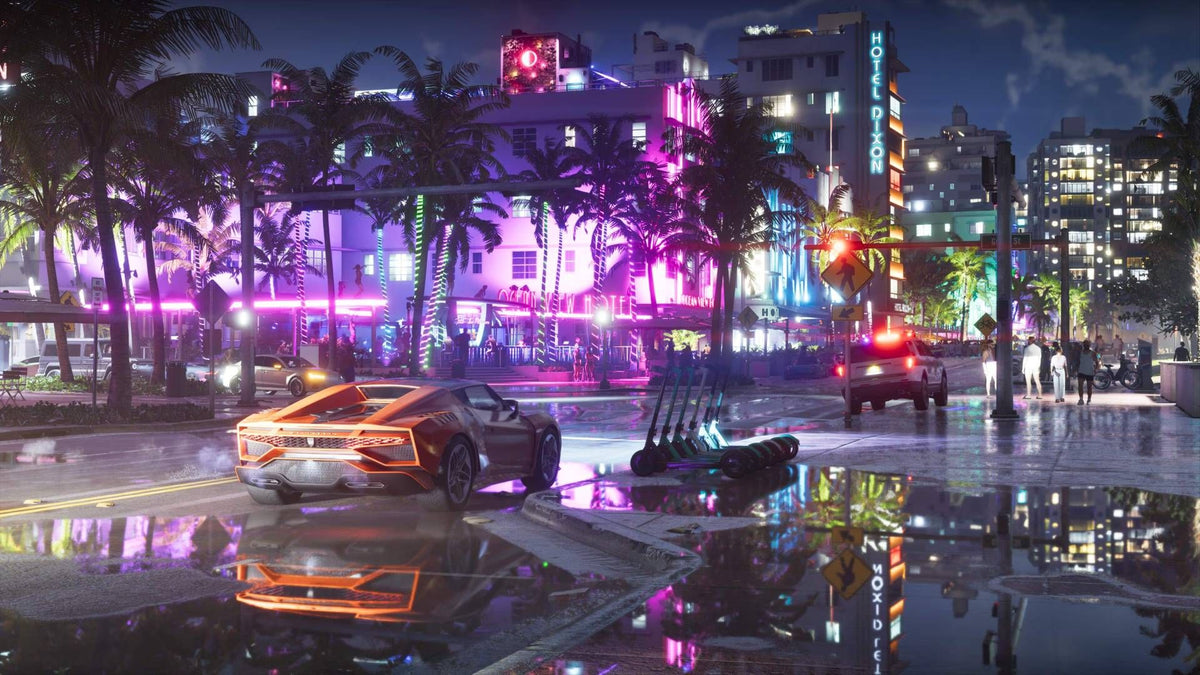
The source discussion focused on launch trailer analysis from HDR and tonemapping experts who believe the footage may show signs of a cheaper SDR-to-HDR style implementation, with no obvious extra highlight detail and some visible colour issues such as hue shifts and banding. That does not confirm the final shipped game experience, but it does highlight something PC buyers often overlook: a game can be massively demanding and visually stunning while still exposing weaknesses in your display chain, graphics settings, or hardware balance.
If you are waiting for GTA 6, or using it as your excuse to finally upgrade, the better question may be this: what do you want your next PC to do for you beyond one game trailer?
What did the GTA 6 HDR analysis actually suggest?
The source article reports that trailer analysts saw potential signs of imperfect tonemapping, including bright blues drifting toward purple and visible gradient issues around bright pool lighting. It also referenced concerns that the HDR output may be based on an inverse-tonemapped SDR approach rather than true, fully realized HDR with extra highlight information.
For regular buyers, that may sound extremely technical. In plain language, it means the trailer may not be showing the kind of high-end HDR presentation enthusiasts hope for from a flagship release. Instead of deeper highlight detail, cleaner colour volume, and more convincing brightness separation, viewers may be seeing a less refined presentation.
Does that mean the game will look bad? Not at all. It means expectations should stay realistic until the game is in players’ hands. It also means your buying decision should not depend only on HDR marketing terms. Raw performance, GPU headroom, display compatibility, VRAM, cooling, and overall system quality still matter more.
Why should Canadian PC buyers care about GTA 6 HDR?
Because major game launches reshape the market. Every time a massive open-world release approaches, buyers suddenly start asking the same questions. Will my current PC run it well? Do I need ray tracing performance? Is 1080p still enough? Should I move to 1440p now? Will I regret buying too little GPU? Should I finance a stronger system instead of settling for an underpowered one?
That is where this story becomes relevant to real purchase decisions in Canada.
If the final game is demanding, and if visual settings such as HDR, ray tracing, high-resolution textures, dense traffic, complex lighting, and long draw distances all matter, then the safest buying strategy is not to chase one feature in isolation. The smarter move is to choose a balanced custom system built for AAA gaming performance, stable frame rates, and upgrade longevity.
For Canadian buyers, timing matters too. GPU demand pressure, memory cost changes, SSD pricing shifts, and seasonal spikes can all affect complete system value. Waiting for the perfect moment often means paying more later for the same performance tier.
What do you want your next PC to do for you?
Before you compare graphics cards or worry about HDR implementation, ask yourself a more useful question: what is your next PC supposed to handle every day?
- Do you mainly want a gaming PC for GTA 6, Cyberpunk-style open world games, and other visually heavy AAA titles?
- Do you want 1080p high FPS for esports and smooth general gaming?
- Do you want 1440p ultra settings with stronger ray tracing support?
- Are you aiming for 4K gaming and premium image quality?
- Will you also stream to Twitch or YouTube while gaming?
- Do you edit videos in Adobe Premiere Pro or DaVinci Resolve after recording gameplay?
- Do you create thumbnails, social assets, or marketing work in Photoshop and Illustrator?
- Are you doing Blender, Unreal Engine, or 3D rendering work in addition to gaming?
Your answer changes the right system completely. A buyer who only wants 1080p gaming does not need the same build as someone who wants a Gaming and Streaming PC Canada customers would use for gameplay, recording, editing, and creator work.
Is HDR the feature to prioritize, or should you focus on overall gaming performance?
For most buyers, overall gaming performance should come first.
A good HDR experience depends on several things working together: the game’s implementation, the monitor or TV, Windows settings, colour pipeline behaviour, and GPU output quality. If even one of those pieces is weak, HDR can feel underwhelming. By contrast, high and stable frame rates, strong 1% lows, enough VRAM, fast storage, and proper cooling improve your experience in every game, every day.
So if you are planning your next system around GTA 6, the real buying priority should be a custom PC that can comfortably handle modern open-world games at the resolution and settings you actually want to use.
Ask yourself this: Would you rather have a checkbox HDR experience on a weaker machine, or a system that can deliver higher settings, smoother gameplay, better streaming, and longer useful life?
What PC do you need for GTA 6-style AAA gaming?
Even without final PC requirements, we can still build smart around the type of game GTA 6 appears to be: large-scale, visually ambitious, dense with NPCs, heavy lighting, and likely demanding on both GPU and CPU. If you are shopping for a Gaming PC for GTA 6, think in performance tiers rather than chasing hype.
Entry tier: 1080p gaming and value-focused buyers
This tier makes sense if you play at 1080p, want solid performance in current games, and care about budget discipline. It is also a strong fit for students, first-time desktop buyers, or anyone asking, how much should I spend on a gaming PC without overshooting their needs.
A good entry-tier build should still include a modern multi-core CPU, a capable GPU with enough VRAM for new titles, fast SSD storage, and at least 16GB of RAM, with 32GB increasingly attractive for heavier multitasking.
Who is this for?
- Players targeting 1080p high settings
- Gamers moving from console to PC
- Buyers looking for a Budget Gaming PC Canada shoppers can grow with
- People who want strong general gaming, but not maximum ray tracing
If your real-world goal is simply, “I want new games to run well and look good without overspending,” this tier may be enough.
Mid-high tier: 1440p gaming, better ray tracing, and stronger longevity
This is where many serious buyers should focus. A 1440p Gaming PC Canada gamers choose today often gives the best balance between visual quality, performance, and future readiness. It is especially compelling for open-world games with large environments, cinematic lighting, and dense detail.
Who is this for?
- Players who want higher settings without stepping all the way into flagship pricing
- Gamers planning around GTA 6 and other major releases
- Buyers who want stronger RT performance and more headroom
- Customers who do some streaming, recording, or editing too
If you are asking, what PC do I need for 1440p gaming, this is likely your sweet spot. It gives you room to enjoy demanding games properly without replacing your system too soon.
Premium tier: 4K gaming, ultra settings, and maximum headroom
If you want a 4K Gaming PC Canada buyers can use for premium AAA gaming, ray tracing, high refresh displays, and creator workloads, you are shopping for a system that needs serious thermal design, power delivery, and component balance.
This tier is ideal for people who do not want to revisit the same buying decision in a year. It is also the right fit for gamers who stream, edit, and multitask heavily while expecting top-tier visual results.
Ask yourself: Are you buying for today only, or are you buying to stay comfortably ahead of upcoming game demands?
What if you also stream, record gameplay, or create content?
This is where many gaming buyers accidentally underspec their system. A game like GTA 6 may already be demanding on its own. Add OBS, browser tabs, Discord, background assets, microphone processing, capture, and video export workloads, and suddenly the “just enough” gaming PC no longer feels like enough.
If you are planning to stream, a Streaming PC Canada buyers choose should have more than raw FPS. You need enough CPU overhead, GPU encoding strength, memory capacity, and storage speed to avoid stutters and workflow slowdowns.
Questions worth asking now:
- What PC do I need for streaming if I also want to play new AAA games at high settings?
- Do I need 32GB of RAM instead of 16GB?
- Will I be recording footage locally while streaming?
- Do I want one PC for gaming and streaming, or one machine that also edits my clips after?
For many buyers, a stronger all-in-one gaming and creator build is the better value than trying to “make do” and then upgrading too soon.
Is a gaming PC also good for video editing, photo editing, and graphic design?
Often yes, but only if the build is chosen properly.
A well-balanced gaming system can double as a Creator PC Canada shoppers use for editing and design, especially if it includes a capable CPU, enough RAM, fast SSDs, and a GPU that helps with accelerated workflows. But not every gaming PC is equally good for creative software.
For video editing
If you edit gameplay highlights, YouTube videos, social content, or long-form footage, your needs may overlap with a Video Editing PC Canada customers would buy. Timeline smoothness, render times, codec support, RAM capacity, and SSD speed become more important.
Ask yourself:
- What PC do I need for video editing if I also game?
- Am I editing 1080p footage, 4K footage, or higher?
- Do I use Adobe Premiere Pro, DaVinci Resolve, or After Effects?
- Would 64GB of RAM save me time and frustration?
For photo editing and graphic design
If your workflow includes Photoshop, Lightroom, Illustrator, Canva, or social graphics, your ideal build should emphasize responsive multitasking, fast storage, and enough headroom for large files and AI-assisted features. A Photo Editing PC Canada customers love is not only about power, but also about consistency.
Questions to consider:
- What PC do I need for photo editing and content creation?
- How much RAM do I need for Lightroom and Photoshop together?
- Do I need a dedicated GPU for my design workflow?
- Will I be running multiple monitors?
For 3D modeling and rendering
If your work includes Blender, Unreal Engine, product visualization, or game asset development, you are crossing into workstation territory. At that point, your system should be treated as a production tool, not just a gaming machine. A proper 3D Modeling PC Canada buyers choose should be built around rendering speed, viewport fluidity, thermal stability, and memory planning.
If you are asking, what PC do I need for Blender or what PC do I need for Unreal Engine, do not buy based on gaming specs alone.
How do you decide which performance tier fits you best?
One of the easiest ways to avoid overspending or underspending is to match your build to your actual use case.
Choose a value-focused gaming build if:
- You game at 1080p
- You mainly play competitive titles with some AAA games mixed in
- You want strong everyday gaming without premium GPU pricing
- You need an affordable path into PC gaming now
Choose a stronger 1440p-focused build if:
- You want better visual quality and stronger longevity
- You are planning around major upcoming releases
- You care about higher texture settings, draw distance, and smoother heavy scenes
- You may also stream, record, or edit
Choose a premium gaming or creator build if:
- You want 4K gaming or very high refresh 1440p
- You care about ray tracing and image quality headroom
- You multitask with streaming, editing, or creator software
- You want to avoid replacing your system again too soon
A useful question here is: Do you want the least expensive PC that works today, or the right PC that still feels strong when the next wave of games and software lands?
Why does timing matter before a massive game release?
Because demand compresses decision-making.
When a giant title approaches, buyers who waited suddenly rush the market. That can create pressure on popular GPUs, high-demand CPU tiers, specific RAM capacities, and high-speed SSD configurations. Even if prices do not spike dramatically all at once, the best-value part combinations can become harder to secure.
There is also a second issue: panic buying leads to poor buying choices. Many customers jump on generic systems that advertise one flashy component but cut corners on cooling, motherboard quality, power supply quality, storage speed, or future upgrade flexibility.
That is why buying earlier, and buying more intentionally, often delivers better results than buying at the peak of release hype.
Should you buy now or wait?
This is one of the biggest questions in PC shopping, and the GTA 6 conversation makes it even more relevant.
If your current system is already struggling in modern games, if you plan to move up in resolution, or if you know you want a stronger machine for streaming or creative work, waiting may simply delay the inevitable while exposing you to worse buying conditions.
Ask yourself honestly:
- Is my current PC already forcing me to lower settings more than I want?
- Will I be shopping at the same time as everyone else once the release window gets closer?
- Am I trying to save money by waiting, or am I risking paying more later for the same or worse value?
- Would I rather enjoy the system now across multiple games and workloads instead of timing everything around one launch?
If your needs are real today, “wait and see” can become an expensive habit.
Could financing help you get the right PC instead of a stopgap upgrade?
For many buyers, yes.
One of the most common mistakes in PC buying is settling for a weaker configuration simply because paying all at once feels limiting. Then, months later, the same buyer is frustrated by performance ceilings, storage shortages, or the need to upgrade again.
That is why some customers choose financing up to 4 years. Instead of buying too little system now and replacing sooner, they step into the right performance tier from the start.
Questions that matter here:
- Should I finance a better PC instead of buying a cheaper one?
- Would monthly payments let me move from entry-level 1080p to a stronger 1440p or creator-ready build?
- Am I better off securing the right GPU now before replacement costs rise?
- Do I want a machine that handles gaming, streaming, and editing together?
For the buyer who knows they need more than a basic system, financing can be the practical way to avoid compromise.
Why custom builds matter more when games and software are getting heavier
A major game launch puts pressure on every weak link in a PC. So do modern creator applications. That is why Custom Gaming PC Canada buyers often get better long-term value from a purpose-built system than from a generic off-the-shelf machine.
A proper custom build is not just about picking expensive parts. It is about matching the CPU to the GPU, choosing enough RAM for real workloads, selecting the right storage layout, providing adequate cooling, and building with an upgrade path in mind.
This matters even more if you are doing any of the following:
- 1440p or 4K gaming
- Ray tracing
- OBS streaming
- 4K video editing
- Adobe Creative Cloud workflows
- Blender or Unreal Engine work
- Heavy multitasking across gaming and production apps
Why buy a system that only looks good on paper if it is not actually tuned for how you use it?
What makes Groovy Computers a better fit for Canadian buyers?
Groovy Computers is built around what serious buyers actually need: custom PCs for gaming, streaming, content creation, and workstation use, backed by Canadian service, rigorous testing, and practical guidance instead of guesswork.
If you are shopping in Nova Scotia, Atlantic Canada, or anywhere else in the country, a custom builder matters because your system should reflect your workload, your resolution target, your budget, and your upgrade plan. That is especially true when game requirements are uncertain and hardware value can shift quickly.
Groovy Computers offers custom-built systems for gamers and creators who want:
- Performance matched to real use cases
- Reliable part selection and build quality
- Stress-tested systems
- A 1-year warranty
- Canada-wide support confidence
- Financing options that can make a stronger build more accessible
Whether you need a budget-friendly gaming desktop, a premium RTX gaming rig, a creator-focused editing machine, or a 3D workstation, the goal is the same: get the right PC the first time.
What should you ask before choosing your next PC?
Before you commit, ask these practical questions:
- What resolution am I really targeting: 1080p, 1440p, or 4K?
- Do I care more about esports frame rates or cinematic AAA visuals?
- Will I use ray tracing?
- Will I stream or record while gaming?
- Do I also need this PC for Premiere Pro, DaVinci Resolve, Photoshop, Lightroom, Illustrator, or Blender?
- How long do I want this system to feel strong before I upgrade again?
- Would financing let me buy the right system now instead of a stopgap system I outgrow fast?
If you can answer those clearly, you are already much closer to the right build.
The real lesson from the GTA 6 HDR story
The trailer analysis may or may not reflect the final PC experience, but it does reveal something important: visual technology headlines can distract buyers from the bigger decision. HDR quality matters, but so do frame rates, display pairing, VRAM, CPU balance, streaming capability, creator performance, cooling, and long-term value.
If GTA 6 is the game pushing you toward an upgrade, that is a good thing. Just make sure you are not buying emotionally around a single feature or waiting so long that you get cornered into a weaker or more expensive choice.
A smart Canadian buyer should be asking, What is the best PC for the games and work I actually do, and how do I buy once instead of upgrading twice?
Ready to choose the right system for gaming, streaming, or creator work?
If you are looking for a Gaming PC Canada buyers can trust for new AAA games, streaming, editing, or mixed-use performance, now is the time to compare what you need against the system you have. Do you want a budget build that gets you into modern gaming, a stronger 1440p machine with better long-term value, or a premium custom PC built to handle gaming and content creation together?
Visit GroovyComputers.ca to explore custom builds, compare performance tiers, and find out whether a gaming PC, creator PC, or workstation build makes the most sense for your goals. If financing would help you secure a stronger system before demand and replacement costs climb further, Groovy Computers is one of the best places in Canada to start that conversation.
#GamingPCCanada #CustomGamingPCCanada #GamingPCForGTA6 #1440pGamingPCCanada #4KGamingPCCanada #StreamingPCCanada #CreatorPCCanada #VideoEditingPCCanada #CanadianCustomPCBuilders #GroovyComputers
Groovy Computers | All Rights Reserved


Leave a comment
This site is protected by hCaptcha and the hCaptcha Privacy Policy and Terms of Service apply.