



































Dodge Viper, LEGO, and Forza Horizon 6: Why This Hype Matters if You Need a Gaming PC in Canada
The return of the Dodge Viper through a new LEGO Technic release and a Forza Horizon 6 in-game livery is more than a fun automotive nostalgia story. It is also a strong reminder of how modern gaming culture works: iconic machines come back through high-detail digital experiences, collector crossovers, and performance-driven play. For Canadian buyers, that makes one question feel especially timely: if games like Forza Horizon 6 are helping bring legendary cars back to life, is your current system ready to enjoy them the way they are meant to be played? If not, this is exactly where a smarter Gaming PC Canada buying decision starts.
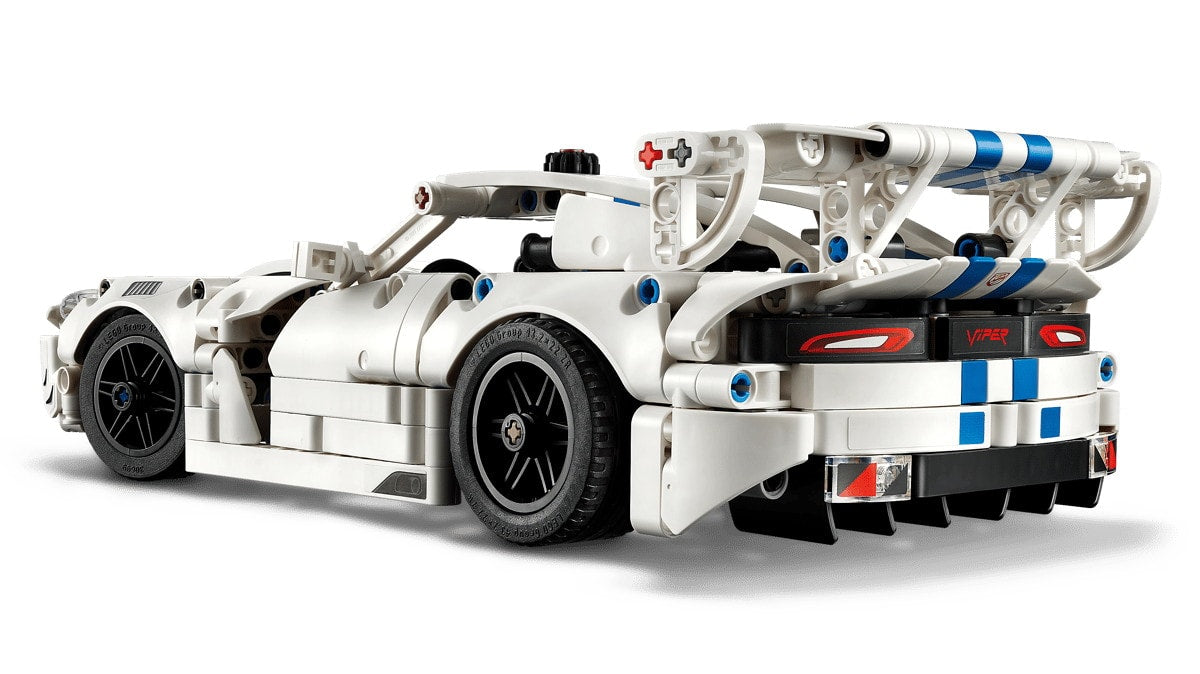
The source story highlights two potent forms of the Viper’s comeback: a LEGO Technic Dodge Viper GTS-R Sports Car set with functional details, and a special Forza Horizon 6 livery tied to the 2016 Dodge Viper ACR. That combination matters because it blends collector culture, car enthusiasm, and modern gaming in one place. It also tells us something important about the way today’s PC gamers buy hardware. They are not just buying for one title. They are buying for a whole ecosystem of visual fidelity, frame rate, streaming potential, creator content, screenshots, clips, mods, and future releases.
If you are following this story because you love Forza, muscle cars, racing games, or premium-looking digital worlds, the next logical question is simple: what do you want your next PC to do for you?
Why the Dodge Viper and Forza Horizon 6 story matters beyond car news
The Viper has always represented excess in the best possible way: huge engine, aggressive styling, track-first energy, and a personality that refuses to be subtle. That same mindset appears in PC gaming. Some players want a practical setup that gets them into the game at 1080p. Others want the equivalent of a track weapon: high refresh 1440p, ray tracing, ultra settings, and enough overhead to handle streaming or recording without compromise.
That is why this news is commercially relevant for Groovy Computers readers. Hype around a game, a collectible, or a crossover event often triggers a bigger buying moment. Maybe you have been putting off a system upgrade. Maybe you have been gaming on an aging machine that still works, but not well enough to enjoy new titles at the visual quality you actually want. Maybe you are asking yourself whether you should buy now, finance a stronger build, or wait and risk higher system costs later.
Those are the right questions.
What did the source article get right?
The source captured the emotional side of the Viper comeback very well. It pointed out that the Viper has been gone for nearly a decade, yet it still carries cult status. It also correctly framed the ACR as one of the most track-focused and memorable versions of the car. The LEGO set adds another layer by making that performance heritage tactile and collectible, while Forza Horizon 6 turns it into something interactive again.
That matters because games like Forza are not just casual distractions anymore. They are visual showcases. They are social experiences. They are content creation platforms. They are often test beds for what players expect from their hardware. When a title features detailed vehicle models, open-world environments, lighting effects, texture streaming, and premium display support, your PC has to be ready for more than just “launching the game.” It has to deliver the experience properly.
So ask yourself: do you want to simply run the game, or do you want it to feel fast, smooth, sharp, and worth your money?
What kind of Gaming PC Canada buyer are you after reading this news?
This is where the article becomes practical. If the Viper and Forza Horizon 6 crossover has your attention, your PC decision probably falls into one of several categories.
- The racing game fan: You want smooth gameplay, fast loading, high settings, and a strong visual experience.
- The open-world gamer: You play visually rich AAA titles beyond racing games and want broader performance value.
- The streamer: You want to play and broadcast gameplay on Twitch, YouTube, or social platforms.
- The content creator: You plan to capture gameplay, edit highlight reels, make shorts, thumbnails, and car edits.
- The all-around enthusiast: You want one machine for gaming, editing, general productivity, and future titles.
Which one sounds most like you?
What do you want your next PC to do for you?
Before you compare GPUs, CPUs, memory capacity, or financing options, start with outcomes. What matters most in your daily use?
- Do you want 1080p gaming with strong value and smooth frame rates?
- Do you want 1440p gaming that feels premium without going fully extreme?
- Do you want 4K gaming and the visual impact that makes modern racing titles look spectacular?
- Do you want ray tracing and higher image quality settings?
- Do you want to stream while gaming without your system struggling?
- Do you want to edit clips in Adobe Premiere Pro, DaVinci Resolve, or CapCut after each session?
- Do you want one build that also handles Photoshop, Lightroom, Illustrator, or other design work?
- Do you want a workstation-capable system for Blender, Unreal Engine, CAD, or 3D rendering?
The answer changes the ideal build more than most people realize. A lot of buyers still ask, “What gaming PC do I need?” The better question is, “What tasks do I need this system to handle well for the next several years?”
Forza-style games are visual showcases, so what PC do you need for 1080p, 1440p, or 4K?
1080p: Best for value-focused buyers
If your goal is dependable performance at 1080p, you do not necessarily need a top-tier machine. A well-balanced budget or mid-range custom build can deliver excellent racing performance, fast system responsiveness, and enough headroom for many modern games. This is often the smartest route for first-time buyers, students, younger gamers, or anyone trying to maximize value.
But here is the real buying question: are you trying to save money today, or avoid needing another upgrade too soon?
If you buy too low, you may save upfront but spend more later when a new title, higher refresh monitor, or recording workload pushes your system past its comfort zone. That is where a properly selected custom build matters.
1440p: The sweet spot for many serious gamers
For a lot of Canadian buyers, 1440p is the best balance of visual quality and long-term value. Racing games benefit enormously from better clarity, stronger detail, and smoother motion, especially if you are using a quality monitor. A strong 1440p setup is also a smarter fit if you play multiple AAA games, want higher settings, or expect your system to stay relevant longer.
Are you shopping for a PC that only handles today’s racing title, or one that stays enjoyable across the next wave of open-world and graphically demanding releases?
4K and high-end visual play
If you want the premium experience, 4K gaming is where hardware demands climb fast. This is especially true if you care about ultra settings, advanced lighting, high-resolution textures, strong frame rates, and future-proof breathing room. This kind of buyer usually values longevity, premium monitors, and flagship performance.
In that case, it makes sense to ask: should you settle for “good enough,” or buy the kind of system you actually want while financing is available and before replacement costs move higher?
Do you also want to stream or record your gameplay?
A lot of people reading a story like this are not just players. They are also potential creators. Racing content is popular because it is visually satisfying, easy to clip, and highly shareable. One dramatic drift, one high-speed tunnel run, or one beautifully specced digital Viper can turn into a short-form video, a YouTube upload, or a livestream segment.
If that sounds like you, then your needs move beyond a standard gaming machine. A streaming PC Canada buyer has to think about encoder support, CPU multitasking, memory capacity, storage speed, and cooling consistency. Playing the game well is one thing. Playing, recording, chatting, and streaming at the same time is another.
So what PC do you need for streaming? Usually, you need more overhead than you think. A system that feels fine for gaming alone can become frustrating once OBS, browser tabs, overlays, Discord, clip software, and capture workflows are all running together.
Are you creating content around games, cars, or social media clips?
This Viper story also connects naturally to creator workloads. Car fans often become editors, thumbnail designers, short-form video creators, or hobbyist photographers. If you are grabbing gameplay footage, editing reels, making TikTok or YouTube content, and juggling multiple creative tools, you may need a creator PC Canada approach instead of a pure gaming build.
That means asking better questions:
- Will you edit in Premiere Pro or DaVinci Resolve?
- Will you make thumbnails in Photoshop?
- Will you design graphics in Illustrator or Canva?
- Will you process RAW photos from car meets or events?
- Will you render 3D assets in Blender or build scenes in Unreal Engine?
If yes, your PC should be selected with those workloads in mind. A gaming-first setup can sometimes do creator work, but not every gaming system is a good long-term creator workstation. Fast exports, smoother timelines, reliable multitasking, and higher memory ceilings can save real time every week.
Is a gaming PC good for video editing, photo editing, or graphic design?
Sometimes yes, but not always in the way buyers assume.
A gaming-focused machine with a strong GPU can be a good start for editing and design, especially for lighter workflows. But if your main work includes 4K editing, heavy effects, large photo libraries, layered Photoshop files, or frequent exports, a better-tuned video editing PC Canada or creator system can make a major difference.
For example, the ideal balance of CPU performance, memory, storage layout, and cooling may differ depending on whether your main use is gaming, Premiere Pro, DaVinci Resolve, Lightroom, or Illustrator. That is one reason so many buyers benefit from a custom PC instead of grabbing a generic off-the-shelf unit with mismatched priorities.
Are you buying a machine to “do a bit of everything,” or are you buying a machine that is supposed to feel excellent at the things you care about most?
What performance tier fits you best?
This is one of the most important parts of the buying process because a lot of customers either overspend in the wrong areas or underspend and regret it later. Here is a practical way to think about it.
Entry tier: Smart for first-time and budget-conscious buyers
This tier suits players who want solid 1080p gaming, good esports and racing performance, fast everyday use, and a clear step up from older hardware. It can also work for lighter editing, school use, and basic creator tasks.
Ask yourself: are you mainly trying to get into PC gaming without overcommitting, or do you already know you will want more visual quality soon?
Mid-tier: Best for balanced gaming and broader use
This is often the strongest value category. It is ideal for players who want stronger 1080p or 1440p performance, better settings, smoother minimum frame rates, and more confidence for upcoming releases. It is also where gaming-plus-streaming or gaming-plus-editing starts to make more sense.
If you want one machine that handles Forza-style gaming, modern AAA titles, content clipping, and some productivity work, this is frequently the sweet spot.
High-performance tier: For premium gaming and creator flexibility
This tier fits customers who want 1440p at a very high standard or 4K gaming with fewer compromises. It also makes sense for buyers who stream regularly, edit larger files, use demanding creator software, or simply want stronger long-term overhead.
Do you want a PC that keeps up, or one that gives you room to grow?
Workstation-class or creator-heavy tier
If your system must handle gaming plus serious editing, motion graphics, 3D rendering, or advanced software workflows, then your build may need workstation-minded priorities. This does not mean it cannot game well. It means the system should be balanced for reliability, memory, storage throughput, thermals, and sustained heavy use.
This is where a custom workstation PC Canada mindset becomes valuable, especially for customers who use Blender, Unreal Engine, Adobe apps, CAD tools, or other professional software alongside gaming.
Should you buy now or wait if a major game or hype cycle is building?
This is one of the most common questions in Canada: is it better to buy a gaming PC now or wait?
The honest answer depends on your current system, your performance expectations, and your budget flexibility. But waiting is not always the “safe” option people think it is. Demand spikes around major game releases, creator trends, back-to-school periods, holiday buying, and flagship hardware cycles can all affect availability and pricing.
Even when a game itself is not a system killer, the excitement around it often pushes buyers into action. That can tighten supply on desirable GPUs, shift build demand, and increase full-system replacement costs. Memory and SSD pricing can also change. If your current PC is already near its limit, waiting can leave you buying under pressure instead of buying on your terms.
So ask yourself something practical: are you shopping early enough to choose properly, or are you about to be forced into a rushed upgrade?
Why financing can make sense if you need a stronger PC before prices change
For many buyers, the wrong move is not financing. The wrong move is buying too weak a system just to keep the upfront price low, then replacing or upgrading far earlier than planned. That is why a lot of customers now ask whether financing a better build is the smarter path.
If your budget today limits you to a system that may feel outdated too quickly, financing can help you secure a better long-term configuration while preserving cash flow. Groovy Computers offers options that can help buyers spread the cost over time, including financing up to 4 years where applicable. For the right customer, that can be the difference between settling and buying confidently.
Should you finance a gaming PC? If the stronger system better matches your actual use, lasts longer, and helps you avoid a second purchase too soon, the answer can be yes.
This is especially relevant if you need more than gaming performance alone. A machine that also supports streaming, editing, design work, or professional workloads can justify the jump much more easily than a bare-minimum build.
Why Canadian buyers should think differently about the LEGO Viper price and overall value
The source article listed the LEGO set at $64.99 USD, which translates to roughly the high-$80s to low-$90s CAD range depending on timing, before taxes. That is not the main issue, though. The bigger point is what enthusiasts are clearly willing to do: pay for a premium experience tied to something they love.
The same logic applies to PC buying. If you are excited enough about a game, a platform, or a hobby to invest in collectibles, premium accessories, or special editions, then your actual play experience matters too. A stronger PC is not just another expense. It is the hardware that determines whether the experience feels smooth, immersive, frustrating, limited, or future-ready.
Would you rather spend repeatedly on smaller compromises, or once on a better foundation?
Why custom PC building matters more than ever
Not all systems are built with the same priorities. Generic prebuilts often cut corners in the exact places customers do not notice at first: airflow, motherboard quality, power supply quality, memory configuration, storage planning, thermals, or upgrade path. Those compromises show up later in noise, instability, throttling, poor longevity, or awkward upgrade limitations.
That is why working with a Canadian custom builder matters. Groovy Computers focuses on properly matched custom builds designed around real use cases, not marketing labels. If you need a gaming machine, a gaming-and-streaming PC, a creator system, or a workstation-class build, the parts should fit the workload.
Would you rather guess which off-the-shelf system is secretly compromised, or get a machine selected with your actual performance goals in mind?
Why testing, support, and warranty matter when you buy a custom PC in Canada
Price is not the only factor that matters. Confidence matters too. When you are buying a new gaming or creator machine, you want to know the system was assembled carefully, stress tested properly, and backed by support after the sale. That becomes even more important when your build is meant to handle higher-end gaming, streaming sessions, or demanding software work.
Groovy Computers positions itself around that confidence: custom builds, rigorous testing, and a 1-year warranty. Those are not small details. They are part of what separates a trusted Canadian custom PC builder from a random listing that looks good only until the first problem appears.
If you are buying from Nova Scotia, Atlantic Canada, or anywhere else across the country, support and trust still matter just as much as performance.
Which buyer should choose a budget gaming computer, and who should go premium?
Choose a budget or value-focused build if:
- You mostly play at 1080p
- You are entering PC gaming for the first time
- You play lighter competitive titles along with some racing games
- You need strong value and can accept more modest future overhead
- You want a practical stepping stone instead of a dream build right away
Choose a stronger mid-range or premium build if:
- You want 1440p or 4K gaming
- You care about visual settings and longevity
- You plan to stream, record, or multitask heavily
- You edit video or create content regularly
- You want to avoid upgrading too soon
- You would rather finance the right machine than replace the wrong one later
Which sounds closer to your situation right now?
What questions should you ask before buying your next PC?
Before you commit to anything, ask yourself these practical questions:
- What games or software will I use most in the next 12 to 36 months?
- Do I want 1080p, 1440p, or 4K performance?
- Do I care about ray tracing, high refresh rates, or ultra settings?
- Will I stream, record, or edit content from my gameplay?
- Do I also need Photoshop, Lightroom, Premiere Pro, DaVinci Resolve, Blender, or Unreal Engine performance?
- How soon do I want to upgrade again?
- Would financing help me get the right tier now instead of compromising?
- Do I want a generic prebuilt, or a custom machine built around my real priorities?
Those questions can save you from the most common mistake in PC buying: choosing a system based only on today’s sticker price instead of total value over time.
Why this Viper story is really about performance culture
The Dodge Viper comeback through LEGO and Forza Horizon 6 works because people still care about performance identity. They care about machines that feel dramatic, memorable, and purpose-built. That instinct carries directly into PC buying. Nobody gets excited by a system that barely keeps up. People get excited by machines that deliver the experience they imagined when they clicked on the trailer, saw the screenshots, or watched the gameplay.
If this story reminded you how much you enjoy racing games, open-world visuals, car culture, or game-based content creation, then it may also be the right moment to think seriously about your hardware. What PC do you need for Forza-style experiences, future AAA releases, streaming, editing, and everything else you actually do?
Need help choosing the right build from Groovy Computers?
If you are asking whether you need a budget gaming computer, a premium RTX gaming setup, a balanced gaming-and-streaming machine, a custom creator PC, or a workstation-ready system, Groovy Computers can help you narrow it down. Instead of guessing, start with a proper custom build conversation based on your games, software, monitor resolution, and long-term goals.
Want a system that is built in Canada, tested carefully, backed by a 1-year warranty, and available with financing options that may help you secure a stronger tier before costs shift? Visit GroovyComputers.ca and take the next step toward a build that fits the way you actually play and create.
Final thoughts: the smart move is buying for the experience, not just the spec sheet
The return of the Dodge Viper through LEGO and Forza Horizon 6 is a reminder that enthusiasm never really disappears. It just finds new formats. For gamers and creators in Canada, that enthusiasm often leads to a bigger decision: whether your current system is still enough for the experiences you care about now.
If the answer is no, then this is the right time to think beyond hype and make a practical move. A better Gaming PC Canada purchase is not about buying the most expensive machine. It is about choosing the right performance tier, avoiding weak compromises, and getting a custom build that supports gaming, streaming, editing, design, or workstation needs without forcing another upgrade too soon.
#GamingPCCanada #CustomGamingPCCanada #GamingPCForForza #StreamingPCCanada #CreatorPCCanada #VideoEditingPCCanada #CustomWorkstationPCCanada #CanadianCustomPCBuilders #NovaScotiaPCBuilder #GroovyComputers
Groovy Computers | All Rights Reserved


Leave a comment
This site is protected by hCaptcha and the hCaptcha Privacy Policy and Terms of Service apply.