



































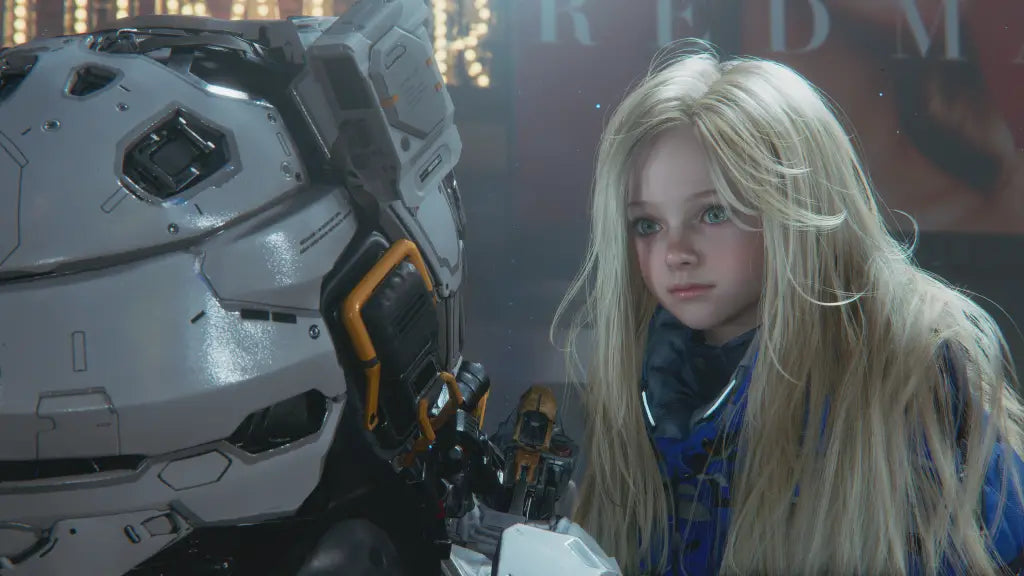
Pragmata Update Shows Why a Gaming PC for New Games Matters More Than Ever in Canada
The latest Pragmata update may look small on the surface, but it highlights a much bigger reality for Canadian players shopping for a new system: modern AAA games keep evolving after launch, and your hardware needs to be ready for more than day-one performance. With Capcom confirming a new Scribble Suit outfit for Hugh, a difficulty adjustment to Training Simulation #30, and the release of the official “Memories Are You” music video, interest around Pragmata is only growing. For anyone following the game, this is a good time to ask a more practical question: is your current PC actually ready for today’s demanding sci-fi action games and tomorrow’s updates?
That is where Groovy Computers comes in. As a Canadian custom PC builder, Groovy Computers helps players, streamers, and creators choose the right system for what they actually want to do, whether that means smooth 1080p gameplay, stronger 1440p performance, ray tracing, streaming, editing gameplay clips, or building a future-proof setup that will not feel outdated too soon.
Why does the Pragmata update matter if you are shopping for a gaming PC for new games?
Because updates like this remind us that major games do not stay static. They receive balance changes, content updates, visual enhancements, accessibility refinements, and ongoing community attention. Even when a patch is focused on cosmetics, difficulty tuning, or minor corrections, it still adds momentum to the game’s popularity. More players jump in, more streamers cover it, and more customers start asking the same thing: what kind of PC do I need for this game and others like it?
Pragmata itself is an especially relevant example because it blends cinematic presentation, combat mechanics, exploration systems, and a futuristic setting that naturally raises expectations for visual detail and performance. The core gameplay pairing of Hugh’s gunplay and Diana’s hacking suggests the kind of layered action experience that many PC players want to enjoy at higher settings, better frame rates, and with more responsive controls than lower-powered systems can consistently deliver.
If you have been waiting for a game to justify a new build, this kind of update cycle often acts as the trigger. You may not just be buying for one title. You may really be buying for a full wave of new releases that are all becoming more demanding at the same time.
What the source story tells us about Pragmata’s appeal
The source article makes a few key points worth expanding on. First, Capcom has updated Pragmata across all platforms. Second, the game continues to build its identity through post-launch support, including the newly added Scribble Suit outfit and the release of the “Memories Are You” music video. Third, the game’s core loop remains one of its biggest differentiators: players control Hugh Williams, who teams up with Diana, an android ally, to survive and escape a lunar base after a devastating separation from his team.
That premise matters from a hardware perspective because Pragmata is not positioned like a stripped-down esports title. It is the kind of cinematic action-adventure that typically benefits from a stronger GPU, a capable CPU, fast storage, and enough memory to keep gameplay smooth while handling high-resolution assets, effects, and multitasking in the background.
The combat system described in the source is also a major clue. During battles, players do not simply shoot. They combine Hugh’s firearm use with Diana’s hacking through an on-screen panel mechanic that disables enemy defences. That means players are likely to value not only raw FPS, but also frame pacing, visual clarity, and low-latency responsiveness. If a game asks you to process action and interface mechanics at once, your PC should feel fast, not hesitant.
What do you want your next PC to do for you?
Before you compare specs, budgets, or financing options, start with the most useful question: what do you want your next PC to do for you over the next two to four years?
Do you just want to play new games like Pragmata at solid settings without worrying about stutters?
Do you want a Gaming PC Canada customers can rely on for 1440p and high refresh rate gameplay?
Do you want ray tracing and stronger visual presets because single-player cinematic games are your priority?
Do you want to stream new releases to Twitch or YouTube while keeping gameplay responsive?
Do you also edit clips, create thumbnails, work in Photoshop, cut YouTube videos, or use Blender on the same machine?
And just as importantly, do you want to buy once and avoid upgrading too soon?
These are the real buying questions. The best system for you depends less on hype and more on your actual mix of gaming, streaming, editing, design, and workstation use.
Why Canadian buyers should think differently about new game releases
In Canada, buying timing matters. New game hype does not just increase demand for the game itself. It can also increase pressure on the PC market, especially when several AAA releases, major software updates, and creator hardware trends overlap. When that happens, customers often run into familiar problems: GPU availability gets tighter, replacement costs shift, and budget systems that seemed “good enough” suddenly look much weaker against the latest game requirements.
That is why many shoppers ask, is it better to buy a gaming PC now or wait? The answer depends on your current system, but waiting is not always the cheaper choice. If your present PC is already struggling with newer games, future patches, driver demands, high-resolution textures, multitasking, or modern creator workloads, waiting can mean paying later for a system you needed earlier.
For Canadian customers, there is also value in buying from a builder who understands local expectations around support, shipping, reliability, and real-world use. Groovy Computers serves buyers who want a custom system built in Canada, properly matched for workload, rigorously tested, and backed by a 1-year warranty rather than a random parts list with uncertain quality control.
What kind of gaming performance tier fits you best?
If Pragmata has you thinking about a system upgrade, the next step is choosing a realistic performance tier. Not everyone needs the same build, and overspending on the wrong category can be just as frustrating as buying too little power.
Entry tier: Is a budget gaming PC enough for you?
A Budget Gaming PC Canada buyer may be perfectly happy with an entry-to-midrange build if the goal is straightforward 1080p gaming, solid frame rates, and good value across a wide range of titles. If you mostly play with balanced settings, are comfortable skipping maximum ray tracing, and want to enter the PC space without overshooting your budget, this tier makes sense.
Ask yourself: are you looking for a first gaming PC, a student-friendly setup, or a practical upgrade from aging hardware?
This category is often right for customers who want strong everyday gaming without chasing ultra settings in every new AAA release.
Midrange sweet spot: Do you want 1440p without going overboard?
For many players, this is the ideal zone. A 1440p Gaming PC Canada build often delivers the best balance of visual quality, smooth gameplay, longevity, and total value. If you are excited about games like Pragmata, want sharper image quality than 1080p, and expect your PC to stay relevant for upcoming titles, this is where many smart buyers land.
Are you the kind of player who wants high settings, strong frame rates, faster load times, and enough overhead for occasional streaming or recording? If yes, midrange-to-upper-midrange is usually the most sensible recommendation.
High-end tier: Are you aiming for 4K, ray tracing, or long-term premium performance?
A 4K Gaming PC Canada customer usually has very clear priorities: premium visuals, stronger ray tracing, maximum texture settings, more demanding future games, and a longer runway before the next upgrade feels necessary. If you love cinematic titles, want your system to stay ahead of the curve, or plan to combine gaming with streaming and editing, a high-end build can be worth it.
But this raises another useful question: should you buy a cheaper PC now and replace it sooner, or buy a stronger system that lasts longer? In many cases, the long-term value is better when the initial build has enough headroom.
What PC do you need for Pragmata-style games?
While the source article does not provide official detailed PC requirements in the text supplied, the game’s structure gives us enough context to make a practical buying recommendation without inventing unsupported specs. Pragmata appears to be exactly the sort of title that benefits from a balanced modern gaming build rather than a bare-minimum machine.
If you want a comfortable experience in current cinematic action titles, you should be thinking about:
- A capable modern CPU for maintaining smooth gameplay and handling background processes
- A strong dedicated GPU for higher settings, better effects, and stronger performance at 1440p or above
- Fast SSD storage for modern game installs, load times, and system responsiveness
- Enough RAM for gaming, browser tabs, launchers, chat apps, and possible streaming or recording
- Quality cooling and airflow so performance stays consistent under long sessions
The more interesting question is not just can your PC run this game? It is can your PC run this game well while also handling everything else you do?
Do you only game, or do you also stream, record, and create content?
This is where many buyers underestimate their needs. A system that feels acceptable for gaming alone may become limiting once you add streaming, capture, Discord, browser sources, OBS, editing software, and asset creation. If you are excited enough about new releases to watch trailers, music videos, patch notes, and creator coverage, there is a good chance you are not just a player. You may also be a content creator in progress.
If you are asking what PC do I need for streaming, your answer is usually not a basic gaming machine. A proper Streaming PC Canada build should account for smooth gameplay under load, encoding efficiency, multitasking headroom, and enough storage for footage and projects.
Are you planning to:
- Stream gameplay live while playing at high settings?
- Record local footage for cleaner edits later?
- Edit shorts, reviews, reactions, or walkthrough videos?
- Manage dual monitors with chat, alerts, and browser tools open?
If yes, you should shop for more than a “game-only” machine. You should be looking at a gaming and creator crossover build.
Could one custom PC handle gaming, streaming, and editing?
Absolutely, if it is chosen properly. This is one of the biggest advantages of working with a custom builder. Many Canadian buyers do not need separate systems. They need one well-balanced machine that can game at night, stream on weekends, and edit footage during the week.
A Content Creation PC Canada customer often has a mixed workflow that includes games, OBS, Premiere Pro, DaVinci Resolve, Photoshop, social content, and browser-heavy multitasking. The wrong parts balance can make that experience frustrating. Too much focus on GPU alone can leave editing performance underwhelming. Too much focus on workstation specs without gaming balance can reduce gaming value. The right custom build avoids that mismatch.
So ask yourself honestly: are you buying your next PC for one game, or for everything you are becoming as a gamer and creator?
What if you also edit videos, thumbnails, or social media content?
That changes the recommendation immediately. If your excitement around a game update also turns into YouTube uploads, TikTok clips, stream highlights, or review content, then you are no longer choosing only a gaming system. You are choosing a productivity tool.
A proper Video Editing PC Canada setup should be selected around timeline responsiveness, export speed, multitasking, codec support, and storage performance. If you work in Premiere Pro, DaVinci Resolve, or even lighter editing software while keeping modern games installed, drive planning and memory capacity matter a lot more than buyers often expect.
Ask yourself:
- Do you want to edit 1080p clips casually, or 4K footage seriously?
- Do you use After Effects, motion graphics, or layered projects?
- Do you need faster exports because your current PC wastes too much time?
- Would a stronger creator-focused build save you hours every week?
If the answer is yes, a custom creator PC from Groovy Computers can give you far better long-term value than a generic one-size-fits-all machine.
What if your workflow includes Photoshop, Lightroom, Illustrator, or design tools?
Not every customer who reads gaming news is only a gamer. Many are students, freelancers, designers, editors, photographers, or business owners who also play games. If that sounds like you, the best buying decision may be a hybrid setup with stronger multitasking, faster storage, and component choices that support both entertainment and work.
A Graphic Design PC Canada or Photo Editing PC Canada buyer may need a system that handles Adobe Creative Cloud smoothly, manages high-resolution files, works well across multiple displays, and still has enough graphics power for modern titles after hours.
Are you designing social graphics, editing RAW photos, building marketing assets, or juggling Photoshop and Illustrator while also wanting to play newer games on strong settings? Then your next PC should be selected with that dual-purpose reality in mind.
What if your interests go beyond gaming into 3D, rendering, or Unreal Engine?
Games like Pragmata do not just inspire players. They also inspire builders, artists, animators, modders, and aspiring developers. If seeing a futuristic title makes you think about Blender scenes, Unreal Engine projects, animation, or cinematic rendering, then you may need more than a gaming desktop.
A 3D Modeling PC Canada or workstation-oriented system should be built around the actual software you use. The best setup for Blender, rendering, Unreal Engine, or asset creation can look very different from a standard gaming-first machine.
Useful questions here include:
- What PC do I need for Blender?
- How much RAM do I need for 3D rendering?
- Is a gaming PC good for Blender, or should I choose a workstation-style build?
- Do I need more CPU power, more GPU power, or both?
Groovy Computers can help match the build to the software, which is critical if your PC needs to earn its keep beyond gaming.
Why timing matters when new games and new workloads keep stacking up
Many buyers put off an upgrade until there is one game they cannot ignore. Then another big release shows up. Then their editing software gets heavier. Then storage fills up. Then their system starts hitching during streams. Then the shopping decision becomes urgent instead of planned.
This is why buying ahead of the pressure point often leads to a better outcome. If you know your current PC is already close to its limits, waiting until it fully fails your needs can reduce your options. Demand spikes, component shifts, and replacement urgency can make that last-minute purchase more stressful.
Do you want to upgrade on your terms while you can compare categories calmly, or do you want to scramble when your old system is clearly no longer enough?
Should you buy a cheaper system now or finance a stronger one?
This is one of the most practical questions Canadian buyers ask, especially when they want better performance but also want to manage monthly cash flow responsibly. If you already know you need more than an entry-level build, forcing yourself into a weaker system just to minimize the upfront price can backfire. You may end up replacing or upgrading sooner than expected.
That is why financing can make sense when used strategically. Rather than settling for a machine that barely meets your goals, financing can help you move into the right tier now. At Groovy Computers, that can mean choosing a better-balanced gaming, streaming, creator, or workstation build with financing options up to 4 years, depending on approval and availability.
So the real question becomes: should you finance a better PC instead of buying a cheaper one that you may outgrow quickly? For many players and creators, the answer is yes, especially if the stronger system saves you from early upgrades, frustrating performance compromises, and replacement costs later.
How do you decide between a gaming PC, creator PC, and workstation PC?
The easiest way is to think in percentages.
If your usage is mostly gaming, with some streaming or light editing, a gaming-first custom build is usually right.
If your usage is split between gaming and serious content work, a creator-focused hybrid machine is likely the best fit.
If gaming is secondary and your main tasks are rendering, professional design, heavy editing, CAD, or 3D workloads, you should look at a workstation-oriented system.
Ask yourself this: what will this PC spend most of its hours doing?
- Mainly gaming: prioritize gaming performance, GPU strength, cooling, and future game readiness
- Gaming plus streaming: prioritize balanced CPU and GPU performance, RAM capacity, and recording/storage needs
- Gaming plus editing/content creation: prioritize a creator balance with faster storage, more memory, and stronger multitasking
- 3D, rendering, CAD, or professional work: prioritize workstation logic, software compatibility, reliability, and sustained performance
Why custom builds make more sense than generic systems for this kind of buyer
When you are buying around a specific need, generic systems often miss the mark. They may overemphasize one part, cut corners on cooling, use weaker power delivery, include limited upgrade paths, or simply fail to match how you actually use your computer.
A custom-built PC is valuable because it gives you control where it matters:
- The right performance tier for your games and software
- The right memory and storage configuration
- The right balance between gaming and productivity
- The right thermal design for long sessions
- The right upgrade path for future needs
If you are asking custom PC vs prebuilt PC Canada, the key difference is fit. A properly selected custom build fits your workload instead of forcing your workload to fit the machine.
Why trust, testing, and warranty support matter when buying in Canada
Performance is only part of the purchase. Reliability matters just as much. A strong-looking spec sheet does not help much if the PC arrives poorly configured, thermally limited, unstable under load, or unsupported after the sale.
That is why Canadian buyers often prefer a builder with a reputation for properly assembled, rigorously tested systems. Groovy Computers focuses on custom builds designed for real gaming and creator use, not just attractive spec bullets. That includes careful part matching, build quality, testing confidence, and a 1-year warranty for added peace of mind.
If you are buying a system meant to handle big games, stream workloads, editing projects, or professional tasks, would you rather trust a random listing or a Canadian custom PC builder that stands behind the machine?
What should you ask before choosing your next custom PC?
Before you place an order, ask yourself these practical questions:
- What games do I actually play now, and what games am I excited for next?
- Am I targeting 1080p, 1440p, or 4K?
- Do I care about ray tracing, ultra settings, or high refresh rate performance?
- Will I stream, record, or edit content on this machine?
- Do I also use Photoshop, Premiere Pro, DaVinci Resolve, Blender, or other creative software?
- How soon do I want to avoid upgrading again?
- Would financing a stronger build make more sense than replacing a weaker one sooner?
- Do I want help from a Canadian builder who can guide me into the right category?
These questions usually reveal the correct answer faster than comparing random model names on a product page.
So, what should you do if Pragmata has you thinking about an upgrade?
If this update has put Pragmata back on your radar, treat it as a timely checkpoint. Not just for one game, but for your broader PC situation. If your current system is already feeling old, if newer games are pushing it harder, or if your gaming setup is starting to overlap with streaming, editing, or creator work, then this is exactly the moment to make a smarter move.
What do you want your next PC to do for you, and do you want to choose it before the next wave of demand makes the decision harder?
Whether you need a budget gaming system, a stronger 1440p machine, a premium ray tracing build, a creator-focused editing setup, or a workstation for heavier software, Groovy Computers can help you choose a system that fits your real use case. If you are ready to buy, compare, customize, or ask about financing, visit GroovyComputers.ca and get matched with a build that makes sense for the way you actually game and work.
In other words, the Pragmata update is more than a small patch note story. It is a reminder that modern games, modern content creation, and modern buying decisions are all connected. The best time to move into the right performance tier is before your current PC starts holding you back.
#Pragmata #GamingPCForNewGames #GamingPCCanada #CustomGamingPCCanada #GamingPCBuilderCanada #ContentCreationPCCanada #StreamingPCCanada #VideoEditingPCCanada #3DModelingPCCanada #CanadianCustomPCBuilders #NovaScotiaTech #GroovyComputers
Groovy Computers | All Rights Reserved



Leave a comment
This site is protected by hCaptcha and the hCaptcha Privacy Policy and Terms of Service apply.