



































Resident Evil Veronica Wishlists Surge: What This Means for Buying a Gaming PC in Canada Before the Next Big Release
The rapid rise of Resident Evil Veronica wishlists is more than just a headline for horror fans. It is also a strong signal for anyone researching a Gaming PC Canada buying decision. When a major remake builds this much momentum so far ahead of launch, it usually means one thing for PC buyers: more people will start upgrading, more gamers will begin comparing GPU tiers, and more shoppers will ask whether now is the right time to move into a stronger custom build before demand heats up.
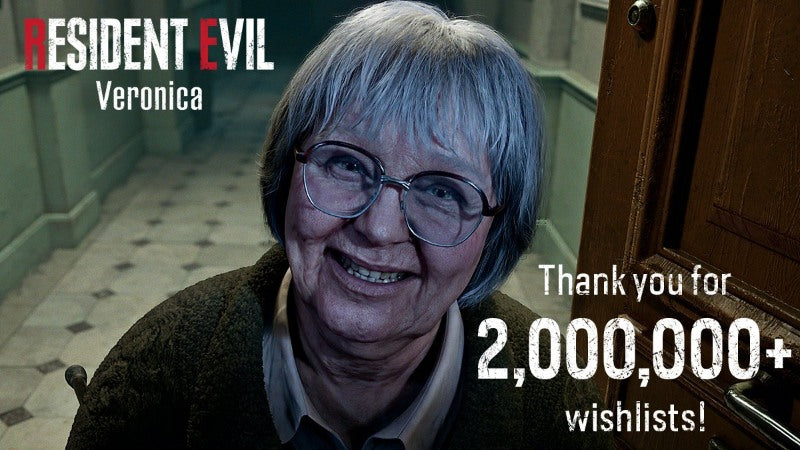
According to the source material, Resident Evil Veronica reached two million wishlists shortly after its reveal, a major milestone for a game that is still about a year away from release. The source also notes that Capcom has already confirmed a third-person perspective and that the team is working toward a more cohesive narrative. For fans of the series, that combination matters. It suggests this remake is not being treated like a minor nostalgia project. It is being positioned as a major modern release, and that kind of release tends to influence hardware buying behaviour long before launch day.
For Canadian gamers, this creates an important question: if you already know a highly anticipated game is on your radar, do you wait until everyone else starts buying, or do you secure the right system while you still have time to compare properly?
Why Resident Evil Veronica matters beyond the news cycle
Big franchise releases do not just sell games. They shape upgrade timing. They push players to revisit old rigs, compare modern graphics cards, and rethink whether their current desktop can still deliver the experience they want at 1080p, 1440p, or 4K.
That is especially true for a title like Resident Evil Veronica. The Resident Evil franchise has become one of the most visible examples of how older survival horror games can be rebuilt into visually dense, performance-demanding modern experiences. Better lighting, more detailed environments, improved effects, denser character models, and modern rendering features all raise the bar. Even before final system requirements are published, experienced PC buyers already understand the likely pattern: newer remakes usually reward stronger GPUs, fast SSDs, enough RAM, and a balanced CPU.
So what happens next? Many shoppers begin with the game, but quickly realize they are not really shopping for one title. They are shopping for the next several years of gaming.
That leads to a smarter question: do you want a PC that can only “get by” on one release, or do you want a custom gaming PC that feels ready for the next wave of AAA games too?
What the source article gets right about the hype
The source article highlights three key points that matter to buyers.
- Demand is already very high. Two million wishlists that far from release shows unusually strong interest.
- Capcom is actively shaping expectations early. A confirmed third-person camera and story refinement give buyers a better sense of the game’s likely scope and modern presentation.
- The release still has runway. With launch still ahead, buyers have time to plan their hardware rather than panic-buying later.
That last point is where the real buying opportunity sits. Waiting until a game launches often means shopping under pressure. Shopping under pressure can lead to the wrong GPU choice, too little RAM, poor storage planning, or buying a machine that looks powerful on paper but is not actually balanced for modern gaming.
Canadian buyers should ask themselves something simple: if you know you want to play the next major horror remake properly, why leave your build decision until the market gets busier?
Why Canadian buyers should think differently about a gaming PC upgrade
Buying in Canada is not always the same as buying in larger U.S.-driven markets. Availability can shift differently. GPU pricing can move quickly. Certain performance tiers can become harder to find at the exact moment demand spikes. Shipping, support, warranty confidence, and the quality of the build itself matter more when every component dollar counts.
That is why a Custom Gaming PC Canada approach often makes more sense than chasing random market listings. A well-built custom system lets you match the GPU, CPU, cooling, memory, and storage to what you actually want to do. It also helps reduce the common mistake of overspending in one area while underspending in another.
Are you mainly planning to play new games like Resident Evil Veronica at high settings? Are you also streaming? Editing clips for YouTube? Running Photoshop, Premiere Pro, OBS, Blender, or other creator tools on the same machine? Those answers change the build recommendation dramatically.
What do you want your next PC to do for you?
Before looking at GPU names or price tiers, start with the real use case.
Do you just want smooth gaming at 1080p?
Do you want 1440p with high settings and room for future AAA releases?
Are you targeting 4K, ray tracing, and a more premium experience?
Will you be streaming gameplay while running Discord, a browser, and OBS?
Do you also need fast exports for video editing, or are you creating thumbnails, social clips, and design assets?
This is where many shoppers realize they do not just need a gaming desktop. They need a machine that supports how they actually spend time at their desk.
For some, that means a focused gaming build. For others, it means a hybrid creator PC Canada setup that handles games after hours and production work during the day. For still others, it means stepping up to a workstation-class configuration because rendering, editing, design, and multitasking are just as important as gaming.
What PC do you need for Resident Evil Veronica and other modern AAA games?
Because final requirements are not yet available in the source material, the smartest approach is not to invent exact specs. The smarter approach is to build around the class of experience you want.
Entry-level 1080p players
If your goal is solid 1080p performance in modern games with sensible settings, you may not need a top-tier flagship system. A well-balanced Budget Gaming PC Canada build can still make a lot of sense if you are focused on value and want to play upcoming releases without spending into premium territory.
This tier is usually best for buyers asking:
- Can I enjoy new games smoothly without chasing ultra settings?
- Do I mostly play on a 1080p monitor?
- Am I trying to stay cost-conscious while still buying something modern?
If that sounds like you, the right strategy is not buying the cheapest machine possible. It is buying a balanced one that avoids an early upgrade trap.
1440p gamers who want the sweet spot
For many Canadian buyers, 1440p is the best overall target. It offers a big visual upgrade over 1080p without pushing system cost as hard as a true 4K build. If you want stronger image quality, better longevity, and more confidence heading into future releases, a 1440p Gaming PC Canada setup is often the smartest middle ground.
This tier fits buyers asking:
- What PC do I need for 1440p gaming?
- How much should I spend on a gaming PC if I want it to last?
- Can I buy one desktop that handles both current and upcoming games comfortably?
For highly anticipated AAA titles, this is often the value-performance tier that gives the best balance of visual quality, FPS, and lifespan.
4K and premium buyers
If your goal is high-refresh 4K gaming, maxed-out visual settings, ray tracing, and longer-term premium performance, then you are in a different category entirely. A 4K Gaming PC Canada system is for buyers who know they want the strongest experience and understand that premium gaming means premium component selection.
This tier makes sense if you are asking:
- What PC do I need for 4K gaming?
- Should I buy a high-end gaming PC now or wait?
- How long will a premium gaming PC last before I need another major upgrade?
For these buyers, part matching and thermal planning matter a lot. A high-end GPU should be paired with the right processor, airflow, power delivery, memory capacity, and storage speed. That is one reason a custom build approach is so important.
Do you only game, or do you also stream and create content?
One of the biggest mistakes buyers make is shopping as if they only game, even though their real workflow includes streaming, recording, editing, browser tabs, Discord, mods, capture tools, and creator software.
If you are planning to stream horror gameplay, upload reaction videos, cut highlight reels, or maintain a YouTube or Twitch channel, then your needs move beyond a basic gaming desktop. A Gaming and Streaming PC Canada build should be selected with enough headroom for multitasking, encoding, and smoother overall system behaviour under load.
Ask yourself:
- What PC do I need for streaming?
- Do I want to play and stream from one machine?
- Will I be recording footage while gaming?
- Do I want better responsiveness when OBS, Chrome, Discord, and my game are all open?
If the answer is yes, then stronger CPU and GPU pairing, more RAM, and faster storage become much more important. A system that feels fine for gaming alone can start to feel cramped once live streaming and content capture enter the picture.
Could a game release like this also be your reason to upgrade your creator PC?
For many buyers, a major game launch becomes the event that finally pushes them to replace an aging machine. But once they start comparing systems, they realize their current PC is not only behind in gaming. It is also slowing down editing, design work, and content creation.
If you cut gameplay footage, produce horror-themed content, make thumbnails, work in Adobe apps, or run short-form editing tools, it may be time to think beyond a gaming-only configuration.
A good Content Creation PC Canada build can support:
- Gameplay capture and recording
- Video editing timelines
- Thumbnail creation in Photoshop
- Graphic layouts in Illustrator or InDesign
- Fast asset loading from SSD storage
- Smoother multitasking between creative tools and games
That naturally raises another useful question: is a gaming PC good for content creation, or should you step into a dedicated creator configuration?
The answer depends on your workload. Some gaming PCs can handle moderate creative use very well. But if your editing, exports, layer-heavy design work, or multitasking are serious enough, a custom creator build is usually the better long-term investment.
What if you also edit video, photos, or graphics?
This is where custom PC selection becomes especially valuable. The right system for horror gaming is not always the same as the right system for productivity-heavy creative software.
For video editing
If you work in Premiere Pro, DaVinci Resolve, After Effects, or even fast-paced YouTube and social editing tools, a Video Editing PC Canada build should prioritize more than average gaming performance. You need timeline responsiveness, efficient exports, solid cooling, and enough memory for larger projects.
Ask yourself:
- What PC do I need for video editing?
- Do I edit 1080p, 4K, or higher-resolution footage?
- How much RAM do I need for video editing?
- Will I game and edit on the same computer?
If your answer includes 4K editing, effects-heavy workflows, or frequent exports, do not underspec your system just because the purchase started with one game in mind.
For photo editing
Photographers and image-focused creators should also take this moment seriously. If your current PC struggles with RAW imports, batch exports, AI features, or large layered Photoshop files, a Photo Editing PC Canada upgrade could save time every week.
Questions worth asking include:
- What PC do I need for photo editing?
- How much RAM do I need for Lightroom?
- Do I need a dedicated GPU for Photoshop and AI tools?
- Would faster SSD storage improve my workflow more than I think?
For graphic design
If your machine supports client branding, marketing materials, packaging mockups, or Adobe Creative Cloud workflows, then a Graphic Design PC Canada setup should be chosen for consistency, responsiveness, and multitasking stability.
You may be asking:
- What PC do I need for graphic design?
- Is a gaming PC good for graphic design?
- Do graphic designers need a dedicated GPU?
- How much RAM do I need for Photoshop and Illustrator together?
These are exactly the kinds of real-world buying questions that matter more than chasing generic spec lists.
What if your workload includes Blender, Unreal Engine, or 3D rendering?
Some readers who land on a game-related article are not just gamers at all. They are students, indie developers, modders, 3D artists, streamers, and technical creators. If that is you, a simple gaming build may not be the right answer.
A proper 3D Modeling PC Canada or workstation-style build is more suitable if you are balancing gaming with Blender, Unreal Engine, rendering, visualization, or asset production. Those users should think carefully about memory capacity, CPU class, GPU acceleration, cooling, and storage configuration.
Questions to consider:
- What PC do I need for Blender?
- What PC do I need for 3D rendering?
- Is a gaming PC good for Blender?
- How much RAM do I need for 3D modeling and workstation tasks?
If gaming is only one part of your system’s purpose, a custom workstation or hybrid creator build can protect you from buying twice.
Is it better to buy now or wait for the game to get closer?
This is one of the most important questions in the whole decision process.
There is no single answer for every buyer, but there is a practical one. If you already know your current PC is behind, waiting does not automatically improve the situation. In many cases, waiting simply compresses your decision timeline and forces you to shop when hype, seasonal demand, and new-release momentum are all stronger.
That can matter because full-system costs are influenced by more than one part. GPU pressure can shift pricing. CPU demand can rise around upgrade cycles. RAM and SSD prices can move. Popular configurations can become harder to source cleanly. And once a wave of buyers all decide they want “the best PC for new games” at the same time, the market tends to get less comfortable for careful decision-making.
So ask yourself honestly: is your current system already making compromises you do not want to live with for another year?
Should you finance a stronger PC instead of buying a weaker one?
For many Canadian shoppers, this is the real question hiding underneath the budget question.
If you buy too low, you may save money today but face an earlier upgrade tomorrow. If you buy more strategically, you may get better longevity, stronger game readiness, and a better overall experience across gaming, streaming, and creative work.
That is why some buyers look at Finance Gaming PC Canada options not as a way to overspend, but as a way to buy correctly the first time. If a stronger GPU tier, more RAM, better cooling, or faster storage would materially improve how long the PC stays satisfying, financing can make that step-up more realistic.
Questions worth asking include:
- Is financing a gaming PC worth it?
- Should I finance a gaming PC in Canada if it helps me avoid replacing it too soon?
- Should I buy a cheap gaming PC or finance a better one?
- Would monthly payments make it easier to secure the right system before prices change?
For buyers who want a machine that handles modern games now and still feels strong when Resident Evil Veronica launches, financing can be the difference between settling and buying with confidence. Groovy Computers offers financing up to 4 years, which can help make a stronger custom build more accessible without forcing a compromise-heavy purchase.
Which performance tier fits you best?
If you are unsure where you fit, this simple breakdown can help.
Choose a value-focused build if:
- You mainly want 1080p gaming
- You are cost-conscious
- You play a mix of older and newer titles
- You want a practical first gaming desktop
Choose a mid-range sweet-spot build if:
- You want stronger 1440p performance
- You plan to play upcoming AAA games comfortably
- You want better lifespan before your next upgrade
- You may also stream or multitask heavily
Choose a premium build if:
- You want 4K or high-refresh high-settings gaming
- You care about top-tier visual quality and ray tracing
- You want more long-term headroom
- You expect to use the system for demanding gaming and creator work
Choose a creator or workstation-focused build if:
- You edit video regularly
- You work in Adobe Creative Cloud or similar tools
- You handle photo libraries, design work, or 3D projects
- You need your PC to be productive first and entertainment-ready second
If you are still unsure, ask the most practical version of the question: what do I want this PC to feel like six months after I buy it? Fast enough? Already limited? Quiet under load? Smooth in games and editing? Ready for the next release? That feeling matters more than spec-sheet noise.
Why custom builds, testing, and warranty support matter more when the market feels uncertain
Not all gaming desktops are equal, even when listed specs appear similar. Build quality, part matching, airflow, power supply quality, BIOS setup, cable management, thermal behaviour, noise, and system validation all affect the real ownership experience.
That is why many buyers choose Canadian Custom PC Builders over generic one-size-fits-all systems. A custom build should not just include good parts. It should include the right parts working together properly.
With Groovy Computers, that means a stronger trust factor for buyers who want clarity and peace of mind. Rigorous testing matters. Stress testing matters. A proper warranty matters. A 1-year warranty helps reinforce that you are buying from a business focused on reliability rather than just moving boxes.
And in Canada, where support confidence is a major part of the purchase, that matters even more.
Why Groovy Computers is a smart fit for Canadian gamers and creators
Groovy Computers is positioned for buyers who want more than a generic spec list. Whether you need a gaming-focused system, a streaming setup, a content creation desktop, or a more demanding workstation configuration, the value is in getting a machine tailored to the way you actually use it.
That means:
- Custom builds matched to your real workload
- Balanced component selection for gaming, editing, streaming, and professional tasks
- Rigorous testing before delivery
- Canadian support confidence
- 1-year warranty protection
- Financing up to 4 years for buyers who want a stronger system without paying all at once
Whether you are in Nova Scotia, Atlantic Canada, or ordering from elsewhere in the country, the key question is simple: do you want to gamble on a generic machine, or would you rather get help choosing a system built around what you actually need?
What should you do before Resident Evil Veronica gets closer to launch?
Use the time now to plan intelligently.
- Decide your main target: 1080p, 1440p, or 4K.
- List the other things your PC needs to handle: streaming, editing, Photoshop, design, or 3D work.
- Think about lifespan, not just today’s price.
- Consider whether financing would let you buy the right system instead of the minimum system.
- Choose a builder that emphasizes testing, reliability, and support.
This is the real lesson behind the Resident Evil Veronica wishlist milestone. Excitement starts early, but smart buyers act before the rush. If your current setup is already showing its age, waiting may not improve your options. It may simply reduce them.
Ready to choose the right custom PC for the next wave of games?
If you are asking yourself what gaming PC do I need, whether a stronger build is worth it, or whether monthly payments would help you move up to a better tier, this is the right time to talk to a builder that understands both performance and value. Visit GroovyComputers.ca to explore custom options, compare the right performance level for your goals, and find a system that fits your gaming, streaming, creator, or workstation needs in Canada.
Resident Evil Veronica may still be on the way, but the buying decision starts now. A headline about two million wishlists is really a reminder that major releases shape hardware demand long before launch day. For Canadian buyers, that means this is a smart moment to secure a Gaming PC Canada solution that matches your resolution target, your broader workload, and your upgrade timeline. If you want smoother gaming, stronger multitasking, better creator performance, and more confidence before the next demand wave, Groovy Computers is one of the clearest places to start.
#GamingPCCanada #CustomGamingPCCanada #GamingPCForNewGames #1440pGamingPCCanada #4KGamingPCCanada #ContentCreationPCCanada #VideoEditingPCCanada #CanadianCustomPCBuilders #FinanceGamingPCCanada #GamingComputersCanada
Groovy Computers | All Rights Reserved


Leave a comment
This site is protected by hCaptcha and the hCaptcha Privacy Policy and Terms of Service apply.