



































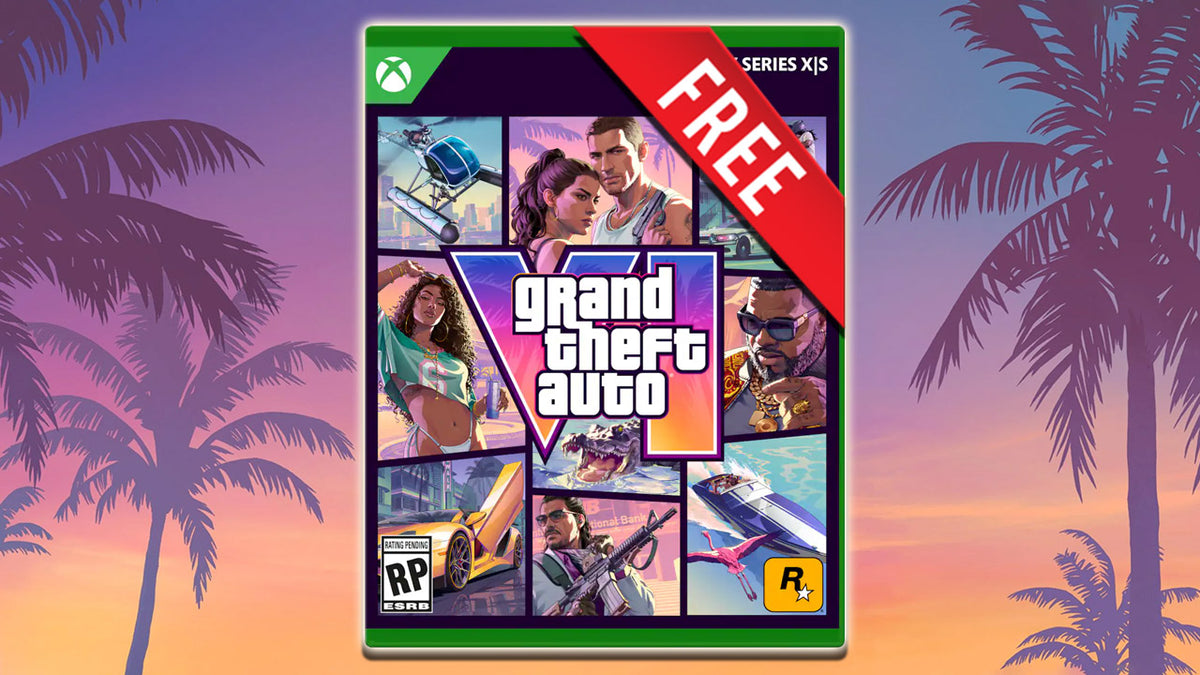
GTA 6 Pre-Order Glitch on Xbox: What Canadian Buyers Should Really Be Thinking About Before the Biggest Game Release
The recent GTA 6 pre-order glitch on Xbox grabbed attention fast. Some users reportedly saw Grand Theft Auto VI listed in their purchase history with a completed price in Canadian dollars, even though they had not actually paid for the game and did not appear to own a valid license. On the surface, it sounded like a dream scenario. In reality, it looks far more like a storefront error than a surprise giveaway. But for Canadian gamers, this GTA 6 pre-order glitch points to a much more important question: if one of the biggest games in years is getting closer, is your current PC actually ready for it?
That is where the story becomes useful. A store glitch is entertaining for a day. A weak system that struggles with new AAA releases is a much bigger problem. If you are planning for GTA 6, open-world games, ray tracing, high-FPS competitive play, streaming, editing clips, or creator work after launch, now is the right time to think beyond headlines and ask what kind of machine will actually serve you well for the next several years.
At Groovy Computers, the smarter angle is not whether a console storefront accidentally showed a game in someone’s history. The smarter angle is whether you are buying your next system early enough, strongly enough, and strategically enough to avoid underbuilding right before demand spikes. If a major release pushes more buyers into the market, what happens to GPU availability, performance expectations, and replacement costs? That is the buying conversation that matters.
What happened with the GTA 6 pre-order glitch?
Based on the source reporting, multiple Xbox users noticed Grand Theft Auto VI: Ultimate Edition appearing in their order history even though they had not made the purchase. In several cases, the listing showed a price attached, but affected users were not actually charged and did not show ownership of the game. Other users reported similar purchase-history oddities involving different titles, which strongly suggests a broader storefront logging issue rather than a real free-game situation.
In other words, this does not look like a secret way to get GTA 6 for free. It looks like a system-side display glitch.
That matters because a lot of gaming buyers react to headlines emotionally. A sudden trend around a blockbuster release can trigger impulse purchases, rushed upgrades, and poor timing. Instead of asking, “Did someone get lucky?” a better question is, What will I actually need to play a game like GTA 6 the way I want to play it?
Why should Canadian gamers care about this story?
Canadian buyers face a different shopping reality than casual gaming headlines usually reflect. Hardware pricing can shift quickly. Exchange pressure affects imported components. Premium GPUs can move up in price. SSD and memory pricing can tighten. And the closer we get to huge game launches, the more buyers start searching for the same thing at once: a machine that will not feel outdated the moment the game installs.
Are you hoping to play at 1080p and simply enjoy the story? Are you aiming for 1440p with strong visual settings? Do you want 4K, ray tracing, and enough headroom to stream or record gameplay at the same time? Those are very different buying paths.
For Canadian shoppers, especially those who want a Gaming PC for GTA 6, the real risk is not missing a storefront glitch. The real risk is waiting too long, buying too cheap, and replacing the system sooner than expected.
What do you want your next PC to do for you?
Before you compare price tags, ask a better question: what should your next PC actually accomplish?
- Do you want a gaming-first machine for new AAA releases?
- Do you want to stream to Twitch, YouTube, or social platforms while gaming?
- Do you want to edit gameplay clips in Premiere Pro, DaVinci Resolve, or CapCut?
- Do you also need photo editing performance for Photoshop or Lightroom?
- Are you doing graphic design work in Illustrator, Photoshop, or InDesign?
- Do you need 3D performance for Blender, Unreal Engine, or rendering workloads?
- Are you trying to avoid another upgrade in 12 to 18 months?
Many buyers start by saying they just want a gaming system. Then they realize they also want OBS open, Discord running, browser tabs in the background, a second monitor active, game clips recording, and enough performance left over to edit content later. That is why choosing the right build category matters.
If GTA 6 is on your radar, what kind of gaming PC should you be considering?
If you are shopping for a Gaming PC Canada buyers can actually grow into, the answer depends on your target resolution, visual quality, and how long you want the build to stay relevant.
Entry performance: good for 1080p gaming and general new-game readiness
This tier makes sense if you mainly want smooth 1080p performance, solid settings, and a sensible budget. It is often the right fit for first-time buyers, students, and players moving up from older hardware. But ask yourself honestly: will you still be happy if future games get heavier, or if your friends move to higher refresh monitors and better graphics settings?
If your goal is “I just want to play new games without headaches,” an entry or lower-midrange build can work. But if GTA 6 is only one of several demanding games you expect to play, going too low may feel limiting faster than you think.
Midrange sweet spot: ideal for 1440p gaming, strong visuals, and long-term value
For many Canadian buyers, this is the smartest category. A 1440p Gaming PC Canada shoppers choose in this range often delivers the best balance between price, visual quality, and future usefulness. This is the tier for people who want modern performance, stronger settings, better frame pacing, and room for more than just basic gaming.
Do you want your system to handle open-world games well today and still feel strong when the next wave of titles lands? Do you want enough overhead for streaming, recording, multitasking, or creator software? Midrange is where many buyers stop making short-term decisions and start buying intelligently.
High-end performance: best for 4K, ray tracing, streaming, and premium game experiences
If your goal is ultra settings, higher resolutions, better ray tracing performance, or a more premium long-term experience, then a High End Gaming PC Canada build may be the right call. This tier is especially relevant if you want GTA 6 to be one showcase game among many, not the one game that pushes your system to its limit.
Are you buying a machine for the next one game, or for the next several years of gaming? That single question often separates a budget-focused decision from a future-proof one.
What PC do I need for 1080p, 1440p, or 4K gaming?
This is one of the most useful questions any buyer can ask before spending money.
1080p gaming buyers
If you use a standard monitor and mainly care about smooth gameplay at sensible settings, a solid budget or lower-midrange custom gaming PC can be enough. This is often the right answer for esports players, lighter AAA users, and people upgrading from older desktops.
But will you stay at 1080p for the life of the system? If you think a 1440p monitor upgrade is in your future, underbuying now may cost you more later.
1440p gaming buyers
For many players, 1440p is the real sweet spot. It looks sharper, feels more premium, and gives modern GPUs room to show their value. If you want a Custom Gaming PC Canada gamers often choose for serious current-gen play, 1440p is where balanced builds start making the most sense.
Do you want high settings in open-world titles, stronger texture quality, smoother gameplay, and better all-around immersion? Then 1440p should be part of your plan.
4K and ray tracing buyers
If you want visual impact, cinematic single-player experiences, and stronger long-term headroom, a 4K Gaming PC Canada build deserves your attention. This is especially true if games like GTA 6 are the exact reason you are upgrading.
Do you care more about maxing settings than minimizing cost? Do you want to avoid saying “I should have gone stronger” six months after purchase? Then high-end planning is usually worth it.
Are you only gaming, or do you also want to stream and create content?
Major game launches do not just drive gameplay. They drive streaming, content creation, YouTube uploads, TikTok clips, community guides, and highlight editing. If GTA 6 is the kind of game you expect to play publicly, record regularly, or build content around, then you may need more than a standard gaming build.
A Streaming PC Canada buyers choose should be designed for both play and production. That means stronger CPU and GPU balance, enough RAM for multitasking, fast storage for footage, and stable thermals for longer sessions.
Ask yourself:
- Will you be using OBS or Streamlabs while gaming?
- Do you want to record long sessions in high quality?
- Will you edit clips after streaming?
- Do you want a single PC for gaming and streaming, or are you building toward a creator setup?
If the answer is yes to any of those, a gaming-only mindset may leave performance on the table. A better fit may be a gaming and streaming build, or even a Creator PC Canada setup if your post-production workload matters as much as the game itself.
Could this upcoming game launch also be the reason you finally upgrade your editing or creator setup?
Many buyers start with gaming intent and end up needing a machine for much more. If you are clipping footage, editing YouTube videos, creating thumbnails, designing overlays, retouching images, or running multiple Adobe apps, your next PC may need to cross categories.
For video editing
If your workflow includes Premiere Pro, DaVinci Resolve, After Effects, or 4K footage, then a Video Editing PC Canada build can save real time every week. Faster timeline response, smoother scrubbing, quicker exports, and better multitasking all add up.
What PC do you need for video editing if gaming is still part of the plan? Usually, you want a well-balanced CPU and GPU combination, generous memory, and fast SSD storage. A weak editing machine can waste hours. A well-built creator system turns waiting time into working time.
For photo editing and design
Are you also working in Photoshop, Lightroom, Illustrator, Canva, or InDesign? Then a Photo Editing PC Canada or Graphic Design PC Canada build may be more appropriate than a gaming-only system. Many modern GPUs help creative workflows, but memory capacity, storage speed, and display planning matter too.
Do you need colour-accurate work, large file responsiveness, AI-assisted tools, or multi-monitor support? If so, your ideal machine should be chosen around workflow consistency, not just frame rates.
For content creators
A Content Creation PC Canada system is perfect for buyers who do not fit in one box. Maybe you game, stream, edit, design, and manage social content from the same workstation. That kind of hybrid use is increasingly common, and it is exactly why custom builds matter.
What if your workload goes beyond gaming and content creation?
Some readers landing on trending gaming articles are not just gamers. They are developers, 3D artists, animators, architecture students, engineers, or professionals with heavy workloads who still care about gaming after hours. If that is you, a standard gaming build may not be enough.
A 3D Modeling PC Canada or Workstation PC Canada build is a better fit when your system also has to handle Blender, Unreal Engine, CAD, rendering, simulation, or professional multitasking.
Ask yourself:
- Are you using Blender or Unreal Engine in addition to gaming?
- Do you need more RAM for scenes, assets, or simulations?
- Are render times affecting your deadlines?
- Would a stronger workstation save enough time to justify the investment?
When the answer is yes, buying the correct class of system matters even more than chasing the lowest advertised price.
Why timing matters more than buyers think
Big game releases create demand waves. That demand does not always mean every component becomes impossible to find overnight, but it can absolutely change shopping conditions. When more people suddenly want a Gaming PC for GTA 6 or another major release, strong GPU-equipped systems become more attractive. Popular performance tiers can tighten. Better-value builds can sell faster. Replacement costs can move.
Canadian buyers should also remember that market conditions are not static. System pricing can be influenced by exchange pressure, incoming product shifts, seasonal surges, and broad demand for graphics hardware across gaming and creator markets. Waiting is not always cheaper. Sometimes waiting simply means paying more for the same class of machine, or settling for a lower tier because the stronger option moved out of reach.
Is it better to buy a gaming PC now or wait? The honest answer depends on your current system, your target games, and your tolerance for compromise. But if you already know your current setup is aging, struggling, or one major release away from feeling obsolete, delaying the decision can be expensive in ways buyers do not notice at first.
Should you buy a cheaper PC now, or finance a better one before prices rise?
This is one of the most practical questions in the entire buying process.
Some buyers try to minimize upfront cost and end up with a system they outgrow quickly. Others use financing to move into a stronger tier that lasts longer, performs better, and avoids a second purchase too soon. If your goal is better value over time, not just the lowest initial number, then financing can be a smart move.
At Groovy Computers, Canadian shoppers who need more breathing room can explore options that help them secure a stronger custom system without having to compromise as heavily at checkout. If financing up to 4 years helps you move from “barely enough” to “actually right for my needs,” that is worth thinking through carefully.
Should you finance a gaming PC if it means getting enough power for 1440p, streaming, editing, or future games? Should you settle for the cheapest tier today if you already expect to upgrade sooner than you want? These are not just money questions. They are value questions.
Which performance tier fits you best?
If you are unsure where you belong, use this practical decision guide.
Choose a budget-oriented build if:
- You mainly play at 1080p
- You want an entry point into PC gaming
- You are focused on value first
- You are okay with more moderate settings in heavier future titles
- You do not plan to stream, edit heavily, or push premium visuals
Choose a midrange build if:
- You want strong 1440p performance
- You play modern AAA games and want solid longevity
- You may stream occasionally
- You want a better overall experience, not just minimum entry
- You want to avoid upgrading too soon
Choose a premium build if:
- You want 4K or high-refresh 1440p
- You care about ray tracing and high settings
- You want to stream, record, and multitask with confidence
- You want a stronger long-term system for multiple major releases
- You would rather buy once properly than replace early
Choose a creator or workstation build if:
- You edit video regularly
- You use Adobe Creative Cloud, DaVinci Resolve, or similar tools
- You work in Blender, Unreal Engine, CAD, or 3D rendering
- You need memory capacity, storage speed, and heavy workload stability
- You want one machine for both professional output and gaming
Why custom builds make more sense than generic one-size-fits-all systems
The more important the purchase, the less sense it makes to guess. A Custom Gaming PC Canada buyer gets from a specialist is not just a collection of parts. It is a system planned around real use cases, matched components, cooling, power delivery, upgrade path, and workload expectations.
That matters when game hype is high. It matters when GPU value differs sharply between tiers. It matters when a buyer thinks they need one type of system but really needs another. And it matters when reliability becomes just as important as raw performance.
At Groovy Computers, custom systems are built for actual Canadian buyers with actual goals. Maybe that is a Budget Gaming PC Canada option for a first-time player. Maybe it is a premium RTX-focused machine for upcoming AAA releases. Maybe it is a creator system that has to game at night and edit all day. The point is fit.
Would you rather gamble on a generic spec sheet, or buy a machine designed around how you really use it?
Why testing and warranty support matter when buying a PC in Canada
A system can look impressive on paper and still become frustrating in daily use if it is not assembled, configured, and tested properly. That is why stress testing, build quality, and support matter. Especially if you are investing in a stronger system ahead of a major game launch or creative workload upgrade, reliability should be part of the value equation.
Groovy Computers emphasizes rigorous testing and a 1-year warranty, which is exactly the kind of confidence many buyers want when they are ordering a custom desktop online. Performance is important. Stability is important too.
If you are buying a PC for GTA 6, streaming, editing, design, or workstation use, do you want the cheapest possible machine, or do you want one you can trust when it actually arrives and goes to work?
What should Canadian buyers ask before ordering a new PC?
Before you finalize anything, ask these questions:
- What games or software will I be using most over the next two to four years?
- Am I targeting 1080p, 1440p, or 4K?
- Do I want ray tracing, high FPS, or premium visual settings?
- Will I stream, record, or edit content too?
- Do I need this machine for Photoshop, Premiere Pro, Lightroom, Illustrator, Blender, or Unreal Engine?
- How soon do I want to upgrade again?
- Would financing a better system now save me from replacing a weaker one early?
- Do I want a generic box, or a custom build chosen for my actual workload?
These questions help turn hype into buying clarity.
So what is the real lesson from the GTA 6 pre-order glitch?
The real lesson is simple: game hype creates attention, but smart buyers use that attention to prepare properly. The Xbox purchase-history issue may disappear as soon as the storefront is corrected. But the demand around GTA 6, major AAA releases, and next-wave gaming performance is not going away.
If you already know your current machine is aging, this is the right moment to decide what your next system needs to do. Do you want a gaming-first desktop? A gaming and streaming setup? A creator machine? A workstation that also games? Do you want minimum entry cost, or stronger long-term value?
Need help choosing the right build before the next big release?
If you are asking yourself what gaming PC you need, whether a midrange or premium tier makes more sense, or whether financing could help you secure a stronger custom system before buying conditions change, Groovy Computers is the place to start. Visit GroovyComputers.ca to explore custom gaming PCs, creator systems, and workstation options built for Canadian buyers who want performance, testing, warranty confidence, and real guidance.
For buyers in Nova Scotia and across Canada, the goal is not to chase a storefront glitch. The goal is to get the right machine before the next major game, software update, or hardware price shift turns a simple upgrade into a rushed compromise. If you want a Gaming PC for GTA 6, a stronger creator system, or a custom workstation that will last, now is a smart time to start the conversation with Groovy Computers.
#GamingPCForGTA6 #GamingPCCanada #CustomGamingPCCanada #GamingPCBuilderCanada #1440pGamingPCCanada #4KGamingPCCanada #StreamingPCCanada #CreatorPCCanada #VideoEditingPCCanada #WorkstationPCCanada #CanadianCustomPCBuilders #GroovyComputers
Groovy Computers | All Rights Reserved


Leave a comment
This site is protected by hCaptcha and the hCaptcha Privacy Policy and Terms of Service apply.