






















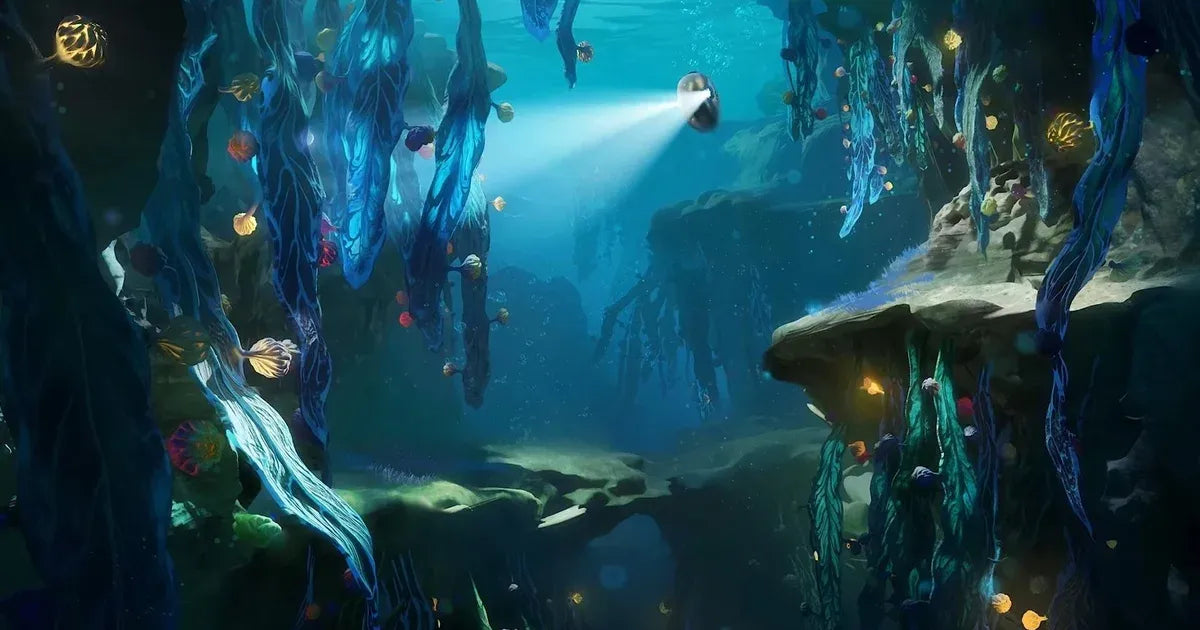
Subnautica 2 Devs Secure $250M Bonus as Legal Battle Ends: What It Means for Gamers Planning Their Next Gaming PC in Canada
The Subnautica 2 legal battle may sound like industry drama at first glance, but for PC gamers in Canada, it points to something more practical: major games can survive behind-the-scenes chaos, launch into huge demand, and quickly put pressure on players to upgrade. Unknown Worlds and Krafton have reportedly settled their dispute, with the studio team now sharing in a payout structure worth about C$340 million when converted from the original US figure. At the same time, Subnautica 2 has already sold millions of copies in early access. That is the real signal for buyers. When a high-interest game gains momentum, more players start asking the same question: is my current PC actually ready for what’s next?
For Groovy Computers, this is where the story becomes useful. A blockbuster survival game with long-term early access support, ongoing content updates, heavier visual expectations, and a growing player base usually creates a familiar market ripple. People who were “getting by” on older hardware suddenly want smoother frame rates, better lighting, more storage, quieter cooling, and enough overhead to handle future patches without replacing the whole system too soon. If that sounds like you, the timing of your upgrade matters more than you might think.
Why the Subnautica 2 Legal Battle Matters Beyond the Headlines
Based on the source material provided, the dispute began when Subnautica 2’s early access launch was delayed and key Unknown Worlds leadership was removed. The conflict escalated into a lawsuit over whether executive changes were tied to avoiding a large performance-based bonus. A court later reinstated CEO Ted Gill, public signs of friction continued, and the game still moved into early access. The final settlement reportedly expands bonus eligibility to all Unknown Worlds employees, not just a narrow executive group.
That outcome matters because it closes one of the messier publisher-developer disputes in recent memory without derailing the game’s commercial momentum. In fact, the source says Subnautica 2 reached one million sales in its first hour and four million copies in roughly seven weeks. For PC buyers, that means one thing: this is not a niche title struggling for attention. This is exactly the kind of release that drives hardware interest, upgrade urgency, and renewed demand for a strong Gaming PC Canada shoppers can rely on for current and upcoming games.
So what happens when a game’s popularity outpaces the hardware many players already own? You start seeing more stuttering, more compromises, more “medium settings for now,” and more people wondering whether they should patch together another temporary upgrade or move to a properly balanced custom build.
What Canadian PC Buyers Should Take From This Story
Canadian gamers do not buy hardware in the same context as U.S. buyers. Exchange rates, shipping realities, inventory swings, and demand spikes can all hit harder here. When a major game starts moving millions of copies, the excitement is global, but the buying pressure lands locally. That is why a headline about a successful early access game can quickly become a buying decision for customers in Nova Scotia, Atlantic Canada, Ontario, Alberta, British Columbia, and across the country.
Are you planning your next system around one game, or are you trying to build for the next two to four years of releases? Do you want a machine that only runs an underwater survival title acceptably today, or one that also handles the next wave of open-world games, ray tracing features, streaming, modding, Discord, browser tabs, background apps, and maybe even content creation? Those are very different purchases.
That is where many buyers make the wrong move. They chase the minimum needed for one title instead of choosing a balanced custom desktop that covers what they will actually do every week. A better question is not just can my PC run this game? It is what do I want my next PC to do for me without feeling outdated too soon?
What Do You Want Your Next PC to Do for You?
If Subnautica 2 has your attention, this is the perfect time to step back and define your real use case.
Do you just want smooth 1080p gaming in survival, crafting, exploration, and co-op titles? Do you want 1440p visuals with stronger texture quality and more headroom for future updates? Are you aiming for 4K immersion, ray tracing, and premium settings in demanding AAA games? Or are you also planning to record gameplay, stream to Twitch or YouTube, edit videos, create thumbnails, or run heavier creative software on the same machine?
Maybe your next system is not only about gaming. A lot of customers who start by researching a game-specific upgrade end up realizing they also need a Content Creation PC Canada buyers can use for Adobe apps, OBS, Blender, or photo editing. If that sounds familiar, it makes no sense to buy a weak entry-level machine now and then replace it early because it cannot keep up with your actual workflow.
The better path is to match the PC to your real habits, not just to the excitement of one launch window.
What PC Do You Need for Subnautica 2 and Other New Games?
The source article does not provide official system requirements, so the safe takeaway is broader: a successful early access release tends to evolve. That means more content, more patches, new biomes, more effects, more players returning with each update, and possibly rising hardware expectations over time. If you are shopping for a Gaming PC for New Games, you should plan for the game as it will become, not only as it launches.
Entry Performance: Who should choose a budget gaming desktop?
If you mainly play at 1080p, prefer good value, and want dependable performance in modern games without chasing ultra settings, an entry-to-midrange build may be the right fit. This is often ideal for students, first-time desktop buyers, or anyone upgrading from an aging prebuilt or console setup.
Ask yourself: are you happy with strong 1080p performance and sensible settings, or do you know you will immediately start wanting more visual headroom? If the answer is “I always end up wishing I bought better,” it may be smarter to step up now rather than upgrade twice.
A well-chosen Budget Gaming PC Canada shoppers can trust should still focus on balance: a capable modern CPU, a solid GPU, fast SSD storage, enough RAM for current games, airflow that does not turn the case into an oven, and a power supply that leaves room for future upgrades.
Midrange Sweet Spot: Is 1440p where most gamers should be shopping?
For many Canadian buyers, the best value is in the 1440p tier. This is where modern games look noticeably better, monitors make more sense as long-term investments, and the system feels less disposable. A strong 1440p Gaming PC Canada customers choose today can often remain satisfying for years if it is built with the right CPU-GPU pairing and enough memory.
If you play open-world adventures, survival games, shooters, mod-heavy titles, or co-op games with friends, this tier is often the smartest answer to the question what gaming PC do I need? It gives you breathing room without pushing straight into flagship pricing.
Would you rather buy once and enjoy the experience, or buy too low and spend the next year adjusting settings, deleting games for space, and browsing upgrade videos? Midrange buyers often know the answer already.
High-End Tier: Do you want 4K, ray tracing, and long-term headroom?
If you are chasing maximum visual quality, larger displays, premium settings, or you simply want a system with longer relevance for future AAA releases, a 4K Gaming PC Canada buyers choose should be treated as a long-term platform, not a short-term splurge. This level is also appealing to customers who stream, record, multitask heavily, or want enough GPU strength to stay comfortable as game demands increase.
Do you want your system to feel premium on day one and still capable years later? Are you the kind of buyer who notices low frame pacing, weak cooling, excessive fan noise, or limited upgrade paths? Then a high-end custom build makes sense if the budget supports it.
Why Big Game Momentum Often Changes Upgrade Timing
One of the most important lessons from the Subnautica 2 story is that game momentum can accelerate buying pressure. A title that moves four million copies in early access is not standing still. It will pull in existing fans, curious new players, streamers, modders, and content creators. That demand does not just affect gameplay chatter. It affects the wider PC market because players begin upgrading around the same time.
Should you buy now or wait? That depends on your current hardware, but waiting is not always the safe choice people assume it is. GPUs can tighten in availability. SSD pricing can shift. RAM pricing can move with broader market trends. New game launches can make midrange cards especially popular. If your current computer is already borderline for modern titles, waiting may only lead to a more expensive replacement later.
This is especially true if you are trying to avoid buying a stopgap machine. The cheapest route today can become the most expensive route over two years if it forces you into an early GPU replacement, a memory upgrade, or a full rebuild sooner than planned.
Could Financing Help You Secure a Better System Before Costs Rise?
For many buyers, the real choice is not between a weak PC and a perfect PC. It is between settling now or spreading the cost of a stronger system that will last longer. That is why financing matters in a market shaped by game releases, software demands, and unpredictable component pricing.
Would a monthly payment make it easier to move from “barely enough” to “actually comfortable”? Would you rather finance a system with the right GPU, enough RAM, stronger cooling, and better storage today instead of paying to fix compromises later? For a lot of customers, the answer is yes.
Groovy Computers helps Canadian buyers think practically about system value. If financing up to 4 years allows you to avoid underbuying, reduce near-term upgrade pressure, and get a better overall experience, it may be the smarter decision. This is especially relevant for gamers who also edit videos, stream gameplay, or use creative software where extra CPU power, RAM, and storage save time every week.
The key question is simple: should you buy a cheaper PC now, or finance a better one that stays useful longer? If your honest answer is that you would outgrow the cheaper system fast, then stretching intelligently can be the more budget-conscious move over the life of the machine.
If You Game, Stream, and Create, Should You Still Buy a Pure Gaming PC?
Not always. This is one of the biggest mistakes buyers make after a headline-worthy game launch. They shop for a gaming-only machine when their real use case is mixed. If you plan to game, stream through OBS, cut clips for social media, edit YouTube videos, make thumbnails, or run Adobe Creative Cloud, then a more balanced Creator PC Canada buyers can depend on may fit better than a narrow gaming-first system.
Do you want to stream at 1080p while playing newer titles? Do you want cleaner exports in Premiere Pro or smoother playback in DaVinci Resolve? Do you need more memory for Photoshop, After Effects, or Lightroom on top of your gaming sessions? Those needs change how your build should be configured.
A Gaming and Streaming PC Canada customers choose should not just benchmark well in one game. It should handle background applications, capture software, browser tabs, Discord, file transfers, and recording without feeling strained. Likewise, a custom creator desktop should not be overloaded with parts that look impressive on paper but create bottlenecks in your real workflow.
What Performance Tier Fits Your Actual Needs?
Choosing the right tier is easier when you stop thinking in vague terms like “good PC” and start thinking in tasks.
Choose entry-level to lower-midrange if:
You mainly play at 1080p
You want solid value and straightforward gaming performance
You are buying your first desktop or replacing very old hardware
You do not need serious streaming or editing power yet
You want a sensible first step into a custom gaming desktop
Choose strong midrange if:
You want 1440p gaming with better longevity
You play a mix of AAA, survival, co-op, and competitive titles
You want enough overhead for future patches and new releases
You may stream casually or edit gameplay clips
You want to avoid feeling upgrade pressure too soon
Choose premium if:
You want 4K or high-refresh 1440p performance
You care about ray tracing, ultra settings, and visual immersion
You multitask heavily while gaming
You stream, edit, or create on the same system
You want a longer-use machine with more room to grow
Choose a workstation or creator-focused build if:
You use Blender, Unreal Engine, Adobe apps, CAD, or rendering tools
You need productivity as much as gaming
You want fast exports, responsive timelines, and better multi-app performance
You need more RAM, storage planning, and workflow-specific hardware matching
You are buying a system to earn, create, or study with, not just play
If you are unsure where you fit, that uncertainty is exactly why custom PC guidance matters. Most people do not need the most expensive parts. They need the right combination of parts.
What Questions Should You Ask Before Buying Your Next Custom PC?
Before you commit, ask yourself a few honest questions.
What games are you really playing over the next 12 to 24 months? Are you buying for one trend, or for your actual library? Do you care more about 1080p value, 1440p balance, or 4K immersion? Will you use ray tracing, or would you rather put the budget into stronger overall performance and more storage?
Do you plan to stream? Record? Edit? Use Photoshop, Illustrator, Premiere Pro, DaVinci Resolve, Blender, or OBS? How many large games do you keep installed at once? Are you constantly deleting titles because storage is full? Do you need Wi-Fi, more USB connectivity, quieter fans, or a cleaner upgrade path?
Would financing help you choose a stronger system that avoids replacement costs later? Are you buying before a major release window, a sale period, or a potential component price move? Are you trying to avoid the frustration of upgrading again in a year?
Those questions matter more than chasing buzzwords. The right PC is not just about specs. It is about fit.
Why Custom Builds Matter More When the Market Feels Uncertain
When game demand rises and hardware pricing shifts, custom builds become even more valuable. A generic off-the-shelf machine may hide weak cooling, limited memory, poor airflow, cut-corner power delivery, or no sensible upgrade path. That is not what most buyers want when they are spending serious money in Canada.
A proper Custom Gaming PC Canada shoppers choose should be balanced, tested, and built around how they actually use it. That means matching the GPU to the monitor and resolution, choosing a CPU that keeps up with modern engines and multitasking, selecting enough RAM for current and near-future use, and planning SSD capacity around real game libraries and content files.
It also means stress testing, quality control, cable management, thermal planning, and support after the sale. Those things are easy to overlook when people focus only on a GPU model, but they strongly affect day-to-day ownership.
Why Groovy Computers Is a Strong Fit for Canadian Buyers
Groovy Computers is built around the needs of Canadian customers who want more than just a parts list. Whether you are shopping for a gaming desktop, a creator-focused machine, or a heavier-duty workstation, the goal is the same: help you get a system that feels right for your budget, your use case, and your upgrade timeline.
That means custom builds tailored to gaming, streaming, video editing, photo editing, graphic design, content creation, and 3D workloads. It means rigorous testing before the system goes out. It means the confidence of a 1-year warranty. It also means practical purchase options, including financing up to 4 years for customers who would rather secure a better machine now than settle for one they will outgrow too soon.
If you are in Nova Scotia, Atlantic Canada, or ordering from elsewhere in the country, the appeal is the same: a Canadian custom PC builder that understands real buyer concerns, not just spec-sheet marketing.
Should You Upgrade Before the Next Wave of Demand Hits?
If a title like Subnautica 2 is pushing you to think about your setup, do not ignore that instinct. The best time to plan an upgrade is usually before your current PC becomes a constant compromise. Not after the frame drops. Not after storage fills up. Not after your next must-play release forces you into low settings or a rushed purchase.
Are you trying to be ready for upcoming games, stronger visual features, and more demanding updates? Do you want a system that can handle gaming today and still support streaming, editing, or school and work tomorrow? Are you worried that waiting could mean worse pricing or fewer good-value options in the performance tier you actually want?
Then this is the moment to move from browsing to planning.
The Bottom Line on the Subnautica 2 Legal Battle and Your Next PC
The Subnautica 2 legal battle ended with a major payout, broader staff compensation, and a studio now focused on the road ahead. For players, the bigger takeaway is that a high-demand early access game can quickly become a reason to rethink your hardware. When a title is selling in the millions and building long-term momentum, your current setup may not stay “good enough” for long.
If you are asking what gaming PC you need, whether 1080p or 1440p makes more sense, whether a creator-focused build would fit better, or whether financing a stronger desktop now could help you avoid early upgrades, Groovy Computers can help. Visit GroovyComputers.ca to explore custom options, compare performance tiers, and get guidance on a build that matches what you actually want your next PC to do.
#Subnautica2 #GamingPCCanada #CustomGamingPCCanada #GamingPCForNewGames #1440pGamingPCCanada #CreatorPCCanada #CanadianCustomPCBuilders #GamingComputersCanada #NovaScotiaBusiness #GroovyComputers
Groovy Computers | All Rights Reserved


Leave a comment
This site is protected by hCaptcha and the hCaptcha Privacy Policy and Terms of Service apply.